

Automatic licensing
Magnolia DX Cloud handles license management automatically so you can focus on building your project rather than managing license files. When you onboard to DX Cloud, your Magnolia support representative provisions your license as part of the setup process. From that point on, the platform takes care of delivering, renewing, and refreshing your license without any action required on your part.
This page explains how the system works at a high level, what to expect during normal operation, and what to do if something goes wrong.
What this means for you
With automatic licensing in DX Cloud, you do not need to:
- Manually install or update license keys. This includes any new module added after your initial onboarding.
- Track license expiry dates.
- Restart your Magnolia instance to apply a new license.
License renewal happens transparently in the background. You can verify your current license status at any time through the About App module in Magnolia Admincentral.
How it works
The automatic licensing system keeps your Magnolia instances licensed and up to date through a chain of managed services.
Licenses are intentionally short-lived to optimize security. The regular polling cycle ensures there are no gaps in license validity, so your Magnolia instance always has a fresh, valid license.
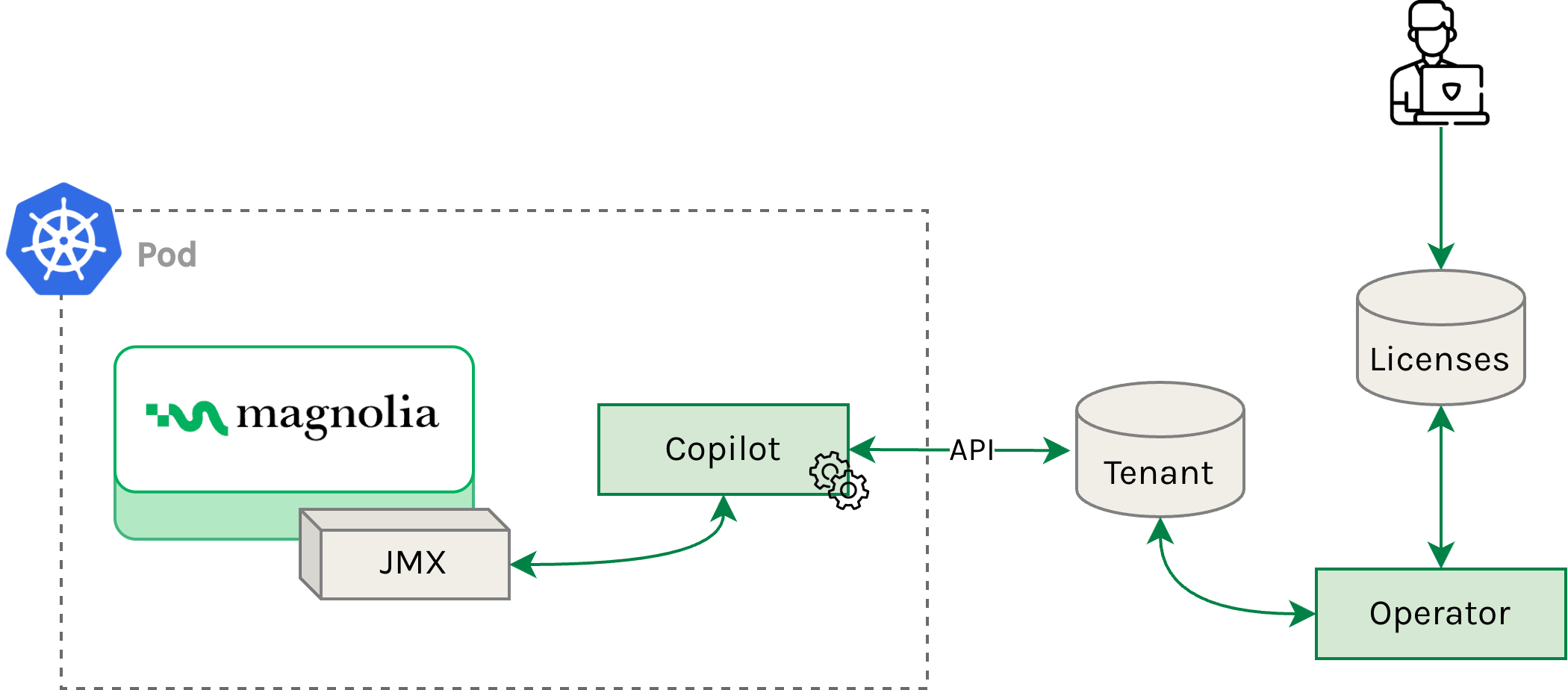
Here is the general flow:
- During onboarding, your Magnolia support representative issues your license in the Magnolia licensing system.
- The license information is stored alongside your subscription data in a central database.
- A license operator reads from this database and creates or updates license records specific to your tenant.
- The tenant-specific license data is written to a dedicated database for your environment.
- A sidecar service running alongside Magnolia retrieves the license via an internal API and delivers it to the Magnolia instance.
- The sidecar polls the licensing API at regular intervals to keep the license current.
JMX must be enabled on your Magnolia instance for automatic licensing to function. This is the default configuration in DX Cloud and requires no action on your part.
Troubleshooting
If you experience a licensing issue, contact Magnolia Support.
Since licenses are fully managed by the platform, you do not handle license updates directly.
In rare cases, a Magnolia administrator may add license information to the license database manually as part of a troubleshooting procedure. This is an internal operation and is only performed by Magnolia staff when resolving targeted issues.