

DX Cloud Architecture
A typical DX Cloud deployment contains productive and non-productive cluster(s) with our Magnolia Platform Services providing metrics, logs, alert management, and cluster orchestration. Clusters can be on AWS, Azure, or GCP.
The Docker Registry, pipeline, source control (git), Jira support, cluster orchestration, the CDN, and of course, the Cockpit are all accessible by the customer.
As shown in Deployment options, users must be authenticated and authorized to access the core elements of DX Cloud, which include:
- Monitoring
- the Cockpit
- Kubernetes
- Source control (
git)
In fact, even the elements themselves require authentication (via Bearer Token) to perform tasks, further securing your Magnolia deployment.
Deployment options
There are three deployment options for Magnolia using PaaS. These depend mainly on the size of your project.
Basic
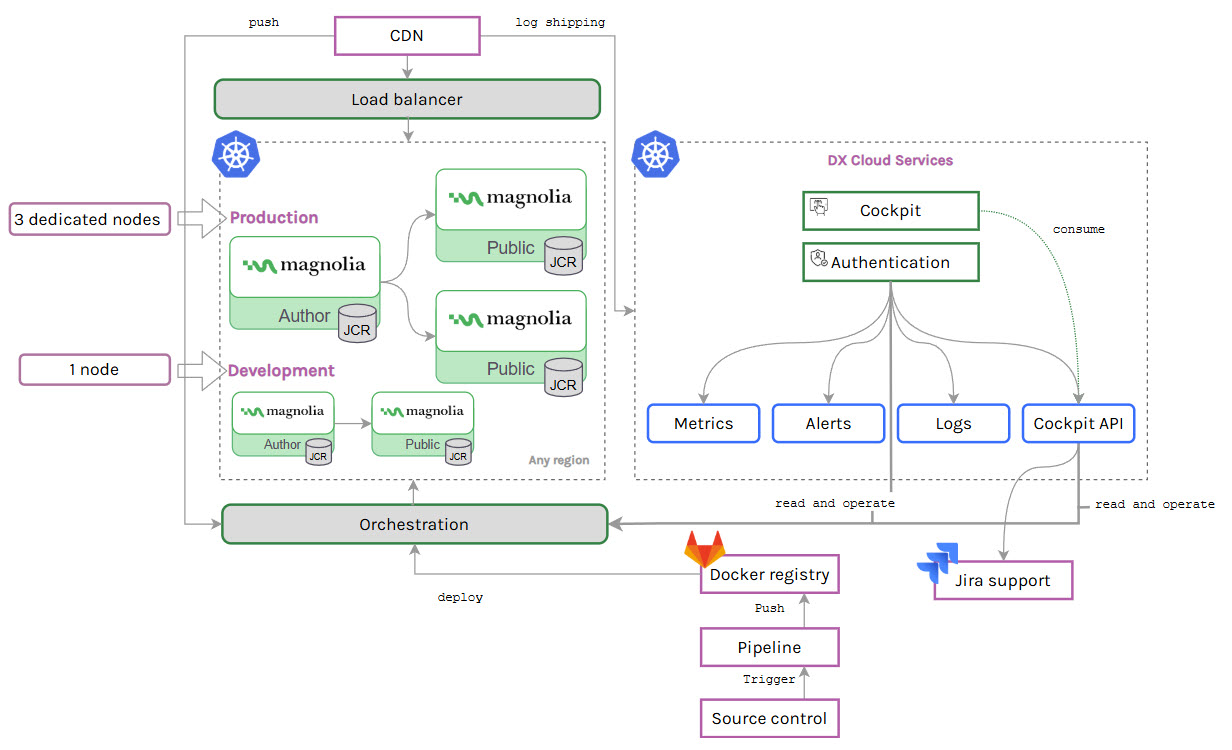
DX Cloud Basic offers:
-
1 Kubernetes cluster
-
4 nodes
All nodes must be in the same Availability Zone (e.g.,
us-east-1a).
-
1 node for the Development environment (
dev)The
devenvironment includes a Public and Author instance on the node. -
3 dedicated nodes for the Production environment (
prod)The
prodenvironment includes one Author and two Public instances on the each node.
If you require more than two environments, you should upgrade to DX Cloud Standard or Premium.
Standard
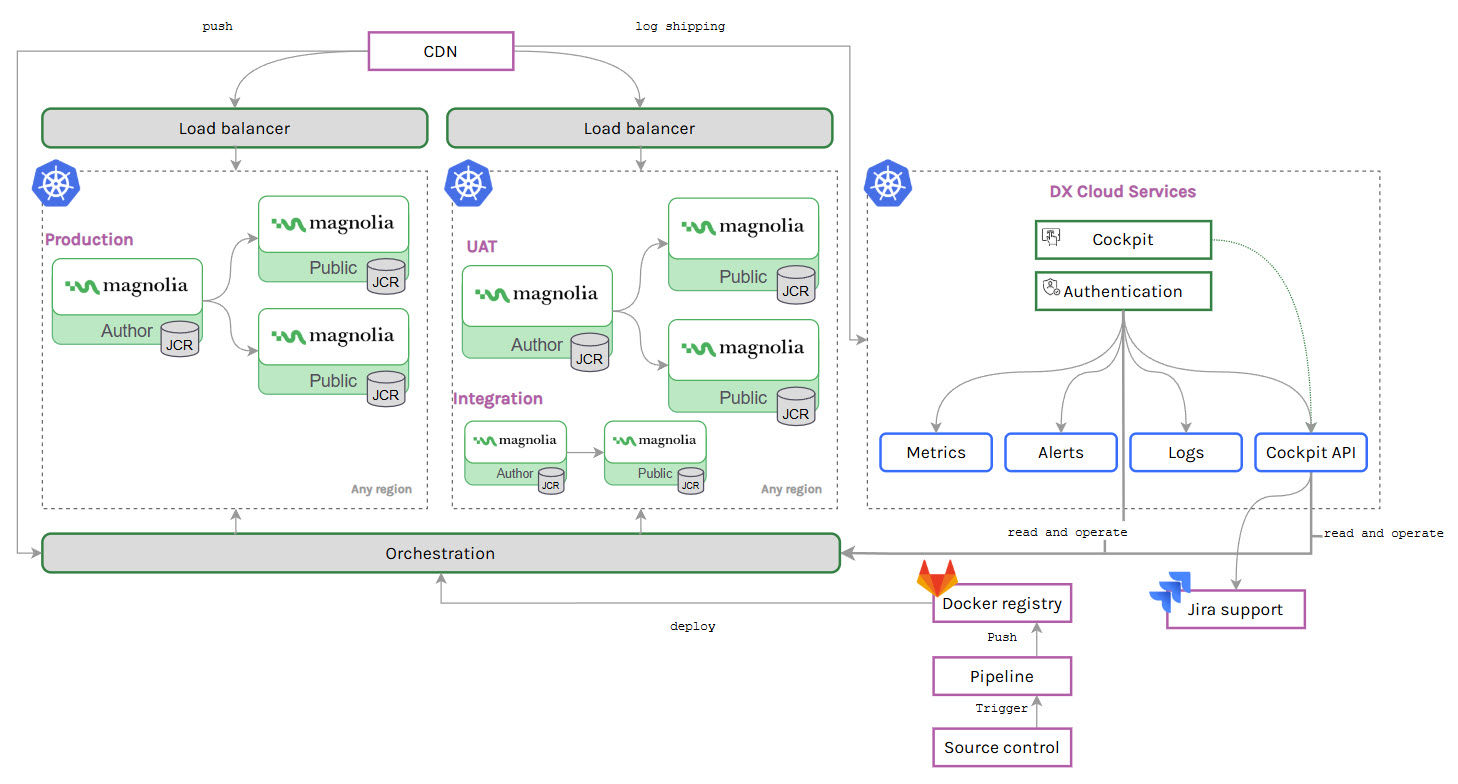
DX Cloud offers:
- 2 Kubernetes clusters
- 1 cluster for non-production environments such as
dev. - 1 cluster for production environments.
- 1 cluster for non-production environments such as
If you require more than two clusters, you should upgrade to DX Cloud Premium.
Premium
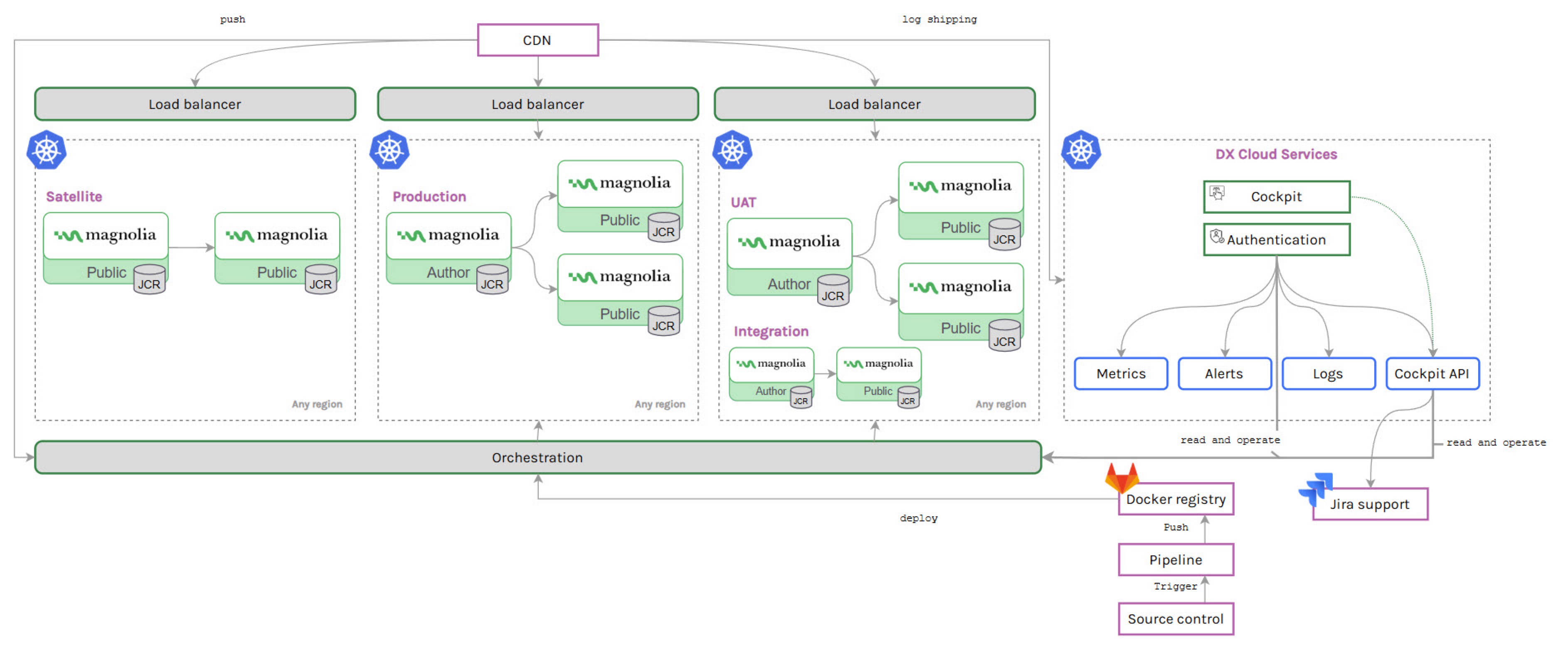
DX Cloud Premium offers:
- 3 Kubernetes clusters
- 1 cluster for non-production environments such as
dev. - 2 clusters for production environments including a satellite cluster for high availability.
- 1 cluster for non-production environments such as
Satellite cluster communication:
Secure communication between the author cluster and satellite clusters is maintained through mTLS (mutual TLS) authentication on current Helm chart releases. The author cluster authenticates itself to satellite clusters using certificates, ensuring trusted interactions without compromising cluster independence.
- Recommended: Use the latest Helm chart (
1.25.0) with mTLS authentication between the author cluster and satellite clusters. - Minimum for mTLS multicluster: Helm chart
1.17.0or later. - Older Helm charts (before
1.17.0): Cross-cluster communication relies on Linkerd. Do not remove or disable Linkerd unless you have upgraded your Helm chart and completed migration to mTLS.
To migrate from Linkerd to mTLS-based multicluster communication, open a Helpdesk ticket. DX Cloud operations will handle the migration for you.
We set up everything in the backend for your multiregion cluster approach.
Traffic routing via CDN
It’s important to understand how your traffic is routed within a Kubernetes and Fastly CDN setup. The diagram here provides a general sequence flow for traffic routing.
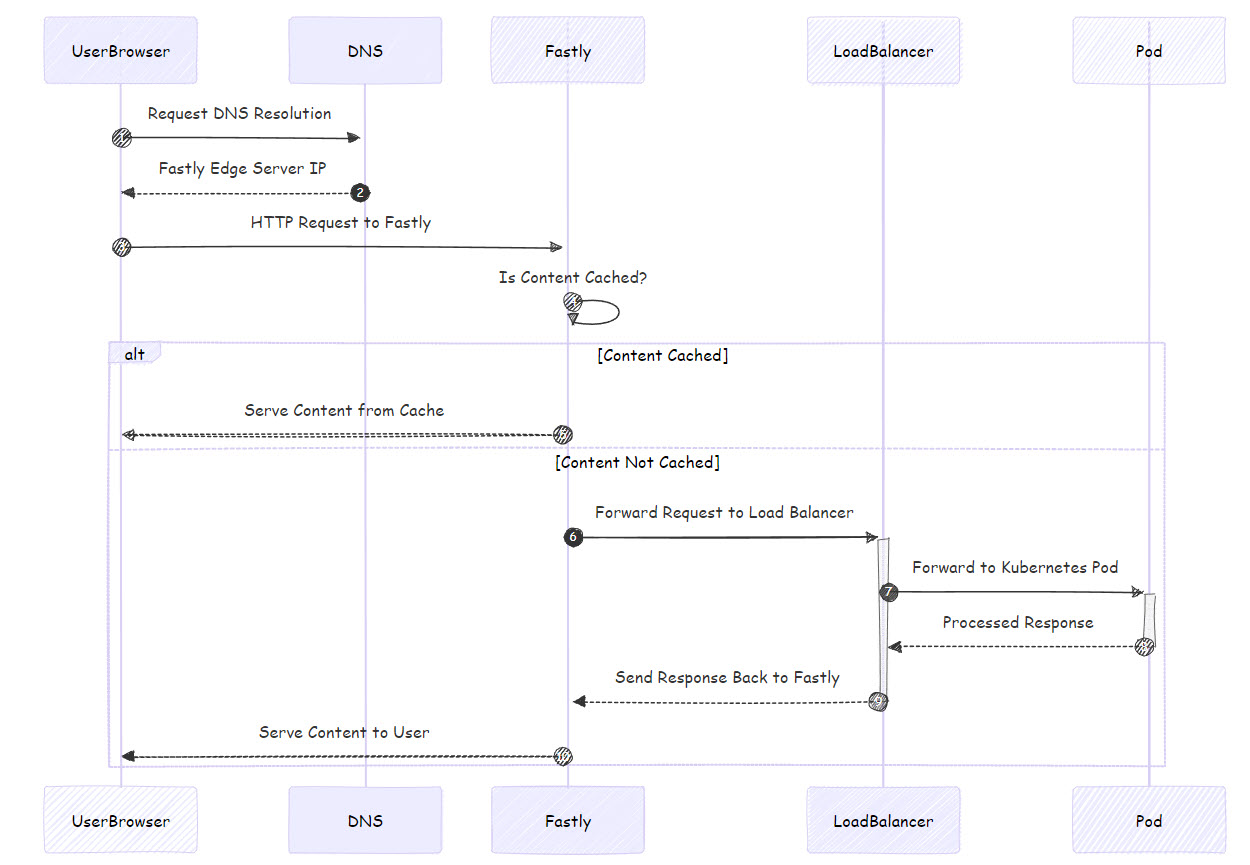
- User Browser: The user initiates the request from their browser.
- DNS Resolution: The browser resolves the website URL to the Fastly edge server.
- Fastly Edge Server: The request is routed to the nearest Fastly edge server.
- Is Content Cached? The edge server checks if the content is cached.
- Yes: If cached, the content is served directly from Fastly.
- No: If not cached, the request is forwarded to the Kubernetes load balancer.
- Kubernetes Load Balancer: This distributes the request to an appropriate pod within the Kubernetes cluster.
- Pod in Kubernetes Cluster: The pod processes the request and sends the response back.
- Response Back to Fastly: The response is sent back to Fastly, where it may be cached for future requests.
- Response Back to User: Finally, the content is delivered to the user.
Kubernetes and sidecars
DX Cloud uses Kubernetes for baseline orchestration of its environments.
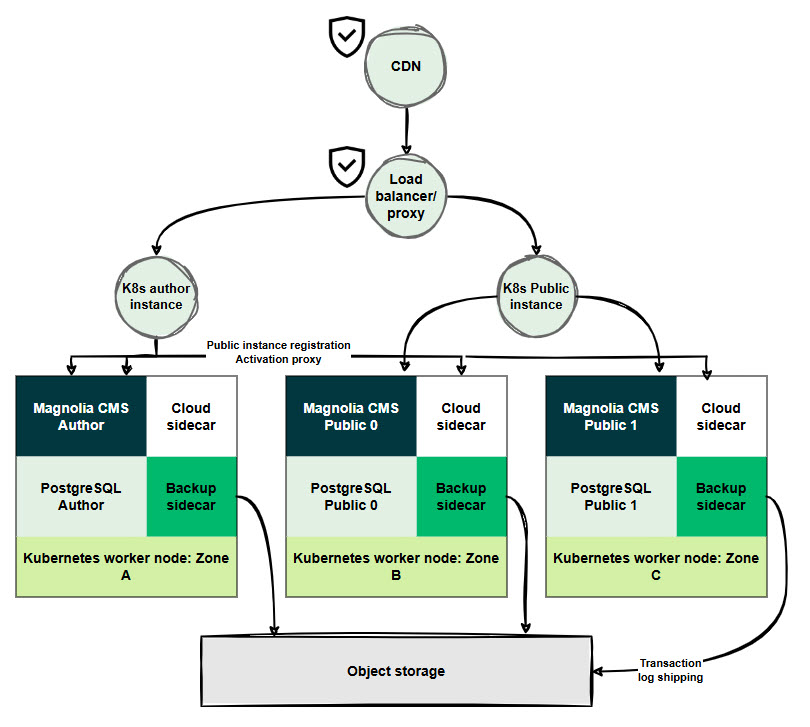
| Item | Note |
|---|---|
| A | The CDN is deployed between the end user and the Magnolia instances. |
| B | Magnolia instances (author/public) are each deployed in a Kubernetes pod containing their own sidecars and K8s workers. |
| C | Sidecar containers are deployed to initialize containers before Magnolia CMS starts. See details below. |
| D | The K8s workers handle pod availability. |
Sidecars
Sidecars are secondary containers that focus on a specific task. They are placed in the same pod as the primary container because resources are shared. Typically sidecars come after the main container in the configuration so the main container is the default target for kubectl execute as shown in the example below (1):
apiVersion: v1
kind: Pod
metadata:
  name: webserver
spec:
  volumes:
    - name: shared-logs
      emptyDir: {}

  containers:
    - name: nginx
      image: nginx
      volumeMounts:
        - name: shared-logs
          mountPath: /var/log/nginx

    - name: sidecar-container <1>
      image: busybox
      command: ["sh","-c","while true; do cat /var/log/nginx/access.log /var/log/nginx/error.log; sleep 30; done"]
      volumeMounts:
        - name: shared-logs
          mountPath: /var/log/nginx
Sidecar container after the main container.