
FAQs
This page answers some of the most frequently asked questions (FAQs) about DX Cloud. See the table of contents for a list of sections.
Content delivery and site access
How do I cache URLs with parameters?
Expand for answer
By default, Magnolia does not cache URLs with parameters, unlike Fastly, which caches them automatically.
If you inspect the response headers, you may see a Cache-Control directive like:
no-cache, no-store, must-revalidate, max-age=0, private <1>This indicates that Magnolia is instructing browsers and proxies not to cache the page.
To allow Magnolia to cache product URLs with query parameters, you need to whitelist the parameters explicitly. You can do this by modifying Magnolia’s cache configuration.
Follow these steps:
- Locate your cache configuration file.
This is usually under
cache/configuration/contentCaching/defaultPageCache/cachePolicy/shouldBypassVoters/deny/parameters/whitelistin your Magnolia instance. - Whitelist the necessary parameters. You must specify which URL parameters should be considered cacheable.
Example configuration
cache:
config:
contentCaching:
defaultPageCache:
cachePolicy:
shouldBypassVoters:
deny:
parameters:
whitelist:
productId: ^\d+$ <1>
category: ^\w+$ <2>Example that allows caching for productId parameters that are numeric.
Example that allows caching for category parameters that are alphanumeric.
Verifying changes
Once the configuration is updated, check the response headers for your product URL.
You should see Cache-Control directives indicating that the content is now cacheable.
For more, see Whitelisting specific parameters.
Is there a way to manage site traffic spikes?
Expand for answer
Yes. With our premium Fastly Waiting Room feature.
For more, see Waiting room .
How do I deliver personalized content with CDN caching?
Expand for answer
If you’re using Magnolia’s personalization features (traits and variants), CDN caching requires special configuration. Without this configuration, all users see the same cached version of personalized pages regardless of their traits.
The CDN must be configured to:
- Extract and normalize trait information from requests
- Create separate cache entries for different trait categories
- Maintain good cache performance by limiting the number of trait variations
For full details, see /operations/configuration/cache/personalization-with-cdn-cache.md.
Can I cache backend responses?
Expand for answer
Yes, you can cache responses from the backend server with some slight tweaks to your Magnolia configuration.
For more on how to do this, see the article here.
Do I need extra configuration for CDN caching?
Expand for answer
Only if you are using a headless approach with a frontend server, in this case, you will have to make sure you set the Cache-Control headers with the values you want the CDN to use.
Can I customize the CDN cache configuration?
Expand for answer
For setups that aren’t exclusively headless, yes.
For more on this, see here.
Can I add additional headers to the CDN?
Expand for answer
Yes. However, this is done with an incubator module.
For more on this, see here .
Are 404 errors cached? Can I exclude them?
Expand for answer
Yes the following are cached by default.
200 OK203 Non-Authoritative Information300 Multiple Choices301 Moved Permanently302 Moved Temporarily404 Not Found410 Gone
You can exclude 404 errors. If you want to do this, please contact the HELPDESK.
Is the CDN cache flushed automatically after publishing?
Expand for answer
#Option 1# You can manually purge the CDN in the Cockpit.
For more details, see the Purge CDN section.
By default, CSS, JavaScript, and images are cached. Pages are not cached by default. However, you can configure your policy to cache Pages.
See Server cache policy for help with that.
#Option 2# You can configure a REST Client to trigger CDN cache flushing.
For more details, see Automate CDN cache flush.
Development
Does {solution} support JCR clustering?
Expand for answer
DX Cloud does not support JCR clustering. This is primarily for performance reasons.
Can I deploy a frontend with PaaS?
Expand for answer
Yes, you can. You can deploy as many frontend applications as you need. In fact, we have a few frontend templates to get you started.
Check them out here.
Why does See logs not appear or open the wrong frontend logs?
Expand for answer
This is usually caused by frontend deployment metadata not matching the expected DX Cloud conventions.
Check that your frontend deployment labels include:
tier: frontendcomponent: author-instanceorcomponent: public-instancesite: <site-identifier>app: <namespace>-magnolia-frontend
If site is missing and you have multiple frontend deployments, pods may appear under unintended frontend app groupings.
If app does not follow the expected naming convention, See logs may be missing or resolve to the wrong stream.
For full details and an example, see Frontend deployments .
I can’t create a password in the Passwords App. What do I do?
Expand for answer
If you are upgrading Helm to version 1.14 or later and running Magnolia 6.2.44+, you must manually move the password manager keypair properties file to the expected location for the DX Cloud Helm chart.
For instructions on how to do this, see Setup: Password manager key.
Why don’t I see thumbnail previews for my assets?
Expand for answer
By default, thumbnails are disabled to ensure optimal performance in DX Cloud.
Projects with a large volume of assets per folder can cause serious performance issues when thumbsnails are enabled.
If you wish to turn thumbnails back on, you can do so by setting thumbnails: true in the dam.subApps.yaml file.
For more details, see best-practices/storing-assets.md.
How do I handle redirects?
Expand for answer
To use redirects in DX Cloud, create them directly via the Cockpit if you are dealing with larger numbers of redirects. If you only have a few redirects (e.g. fewer than 10), you can manage them directly in a redirects ingress.
Can I have a dedicated custom error page per site?
Expand for answer
Yes, you can have a dedicated custom error page per site by using Virtual URI mapping. However, you should always proceed with extra caution when using Virtual URI mapping.
For more details, see Virtual URI mapping.
- In your configuration at
server/filters/cms/bypasses/, remove the docroot bypass. - In your configuration at
server/webContainerResources/mappings/, change/docroot/*to/modules/*.
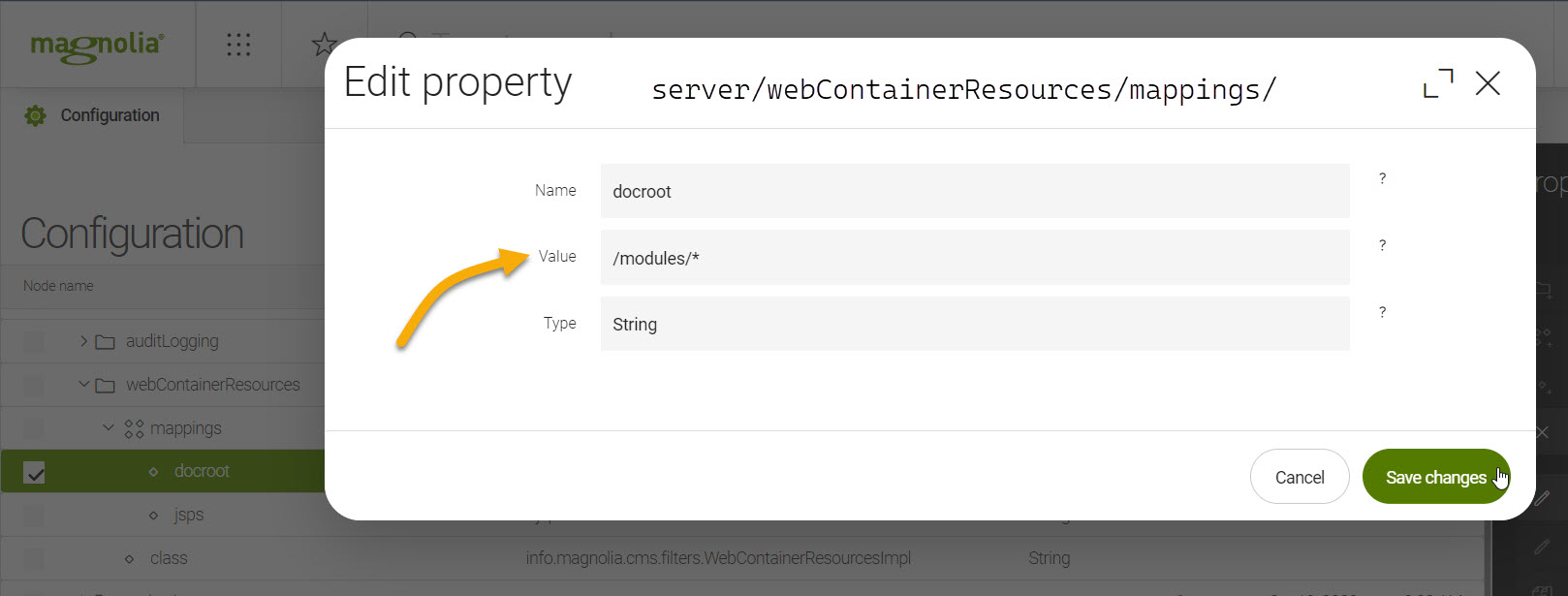
- Configure your Virtual URI mapping.
Example configuration
class: info.magnolia.virtualuri.mapping.DefaultVirtualUriMapping
fromUri: /docroot/404.html <1>
toUri: forward:/404.html <2>Routes from the root 404 page (which happens by default).
Routes to the 404 page found in the site tree.
SSO on {solution} isn’t working. What do I do?
Expand for answer
If SSO is failing due to incorrect protocol inference, setting the port to https in the Helm chart ensures Magnolia will generate redirect URLs using HTTPS.
Example
- host: {{ .Env.DEPLOYMENT }}.author.paastraining.magnolia-platform.io
paths:
- path: /
instance: author
port: https <1>To do this, ideally, you should be using Helm {helm-chart-version} or {helm-chart-version-1}.
Domains and Certificates
Do SSL certificates have to be configured on Fastly and Kubernetes?
Expand for answer
Yes.
However, this is done automatically.
You just need to add the certificate via the Cockpit.
Once the certificate is ready and the Fastly annotation has been correctly applied, the certificate is automatically sent and configured in Fastly.
Where do I point A records to?
Expand for answer
If you need to map a domain using an A record, point the domain to the IPs associated with the load balance servers.
You can retrieve this with the following command:
dig https://adb8bffe76c8c422087e3732eabd17b9-58b5e8e7a952af5b.elb.eu-central-1.amazonaws.comThe response includes the IP address you should use for your A record.
Can I use a wildcard when adding a certificate?
Expand for answer
Yes, you can use wildcards for custom certificates, which are handled in the Cockpit .
However, if using LetsEncrypt, you must file a Support request for wildcard certificates as of today.
Should I use organization-validated (OV) certificates?
Expand for answer
In most cases, no.
We recommend Magnolia-managed certificates where possible. If you use custom certificates, we generally recommend domain-validated (DV) certificates because issuance and renewal are simpler and operationally more reliable.
Organization-validated (OV) certificates are still supported through the custom certificate process in the Cockpit . However, OV certificates are usually only necessary when your internal policy or compliance requirements explicitly require organization-level validation.
General
Are {solution} users automatically logged out after a period of inactivity?
Expand for answer
Yes. After 15 minutes of inactivity, the user is automatically logged out of the Cockpit.
Can you send emails with {solution}?
Expand for answer
In short, no. This is not currently in scope for DX Cloud.
At the moment, we recommend that you use some of the available external services such as Mailgun, Mailchimp, etc.
The above statement is not an endorsement of any particular service, but is solely intended to provide a starting point for your mail service search.
How many authors can work in Magnolia on {solution}?
Expand for answer
There is technically no exact maximum to the number of concurrent authors that can be working on Magnolia on DX Cloud.
However, we recommend that no more than 50 authors work in Admincentral concurrently. This helps avoid latency issues in Admincentral due to too many authors using the Pages app, too many authors publishing, or just generally too many actions occurring simultaneously.
Helm
How do I find the latest Helm chart version?
Expand for answer
The latest helm chart version is ${helm-chart-version}.
Do I need to use the latest Helm chart version?
Expand for answer
The latest Helm chart is required for compatibility and optimal performance. We strongly recommend always deploying the latest Helm chart to leverage enhanced stability, security updates, and streamlined configuration management.
For detailed guidance on Helm charts and the values.yml file, refer to /operations/deployment/helm-values.md.
What is the minimum Helm chart version needed for Magnolia 6.3?
Expand for answer
The minimum Helm chart version needed for Magnolia 6.3 is 1.15.0.
However, we strongly recommend you upgrade to the latest Helm chart version chart where possible to ensure compatibility and the latest features.
You upgrade your version in the .gitlab-ci.yaml file.
...
helm upgrade prod mironet magnolia-helm --version 1.23.0 -f values_new.yml -n prod
...The latest helm chart version is ${helm-chart-version}.
For more on Magnolia 6.3, see Magnolia 6.3.
What is the minimum Helm chart version for multicluster mTLS?
Expand for answer
For more on this topic, see Architecture and Multicluster.
How do I update the Helm chart version?
Expand for answer
You update the Helm chart version in the .gitlab-ci.yaml file.
You must modify the version, the values file, and the namespace.
Pipeline configuration may vary by customer implementation; though we do provide blueprints.
Ensure you adapt the configuration accordingly to fit the project requirements.
Global variable
Specify the desired Helm chart version here. This shows the latest version.
.gitlab.ci.yaml file
variables:
HELM_CHART_VERSION: 1.23.0Command line
...
helm upgrade prod mironet magnolia-helm --version 1.23.0 -f values_new.yml -n prod
...Ingresses
How do synchronization and claiming work for Ingresses?
Expand for answer
Synchronization
- Updates the Cockpit view of an unclaimed ingress to match its current configuration in the Kubernetes cluster (for example, managed via Rancher).
- Lets you review the ingress state in the Cockpit before deciding to claim it for Cockpit management.
- Available only for unclaimed ingresses.
- Ingresses created in the Cockpit are typically claimed and aligned with Kubernetes on publish. Synchronization is mainly needed if there are external changes or validation issues.
Claiming
- When you claim an ingress, the Cockpit takes exclusive control of it.
- After claiming, synchronization is disabled because the Cockpit manages the ingress configuration exclusively.
- External changes to a claimed ingress (for example, via Rancher) are not reflected in the Cockpit and will be overwritten by any Cockpit publish.
- To avoid conflicts, manage claimed ingresses exclusively through the Cockpit.
In short, synchronize to review the latest state of an unclaimed ingress, then claim it to manage it in the Cockpit. Once claimed, synchronization stops.
See Synchronize an ingress for details.
How do I set Fastly as my CDN provider for an ingress?
Expand for answer
To set your CDN provider to Fastly in the ingress:
- First, connect to Fastly.
- Then, set
magnolia.info/cdn-providertofastly.
magnolia.info/cdn-provider: fastly <1>In this example, fastly is set as the CDN provider.
With this setup, you’ll be able to whitelist the IPs necessary for Fastly to retrieve pages from the ingress.
For more on whitelisting, see Basic auth whitelisting.
Is it okay to use ingress-nginx snippets?
Expand for answer
Generally, no. You should only use configuration and/or server snippets exactly as instructed by documentation or the DX Cloud team. Making changes to these snippets without consultation or approval could lead to unintended consequences for your PaaS project.
I want to add snippets for redirect rules. Is this okay?
Expand for answer
No. As stated in Is it okay to use ingress-nginx snippets?, we generally advise against using nginx-ingress configuration and server snippets and you should only use it exactly as instructed by the documentation or the DX Cloud team.
For redirects, use our Redirects feature in the Cockpit.
Licenses and passwords
How do I add my Magnolia license for {solution}?
Expand for answer
Your license is provisioned automatically during onboarding for DX Cloud.
For more details, see automatic-licensing.md.
How do I update my Magnolia license key?
Expand for answer
Your license is automatically renewed and refreshed transparently in the background.
For more details, see automatic-licensing.md.
Do I need to set the password manager key location?
Expand for answer
No, you should not set the password manager key location. Unlike with Magnolia DX Core, this value is set automatically for you. Entering a value for this property may override the default value and cause issues.
For more details on this property and general configuration management, see Configuration management.
Managing PaaS
What is a sticky session?
Expand for answer
Sticky sessions, or session persistence, is when you instruct the load balancer to remain linked to a specific node (server) to avoid losing the session data if the request goes to the other server. Essentially, you send the request from a given IP to the delivery server, but continue to send follow-up requests to the same server until the session expires. Session persistence is needed when the project has transactions or required data in the session.
Sticky sessions are typically used in situations where you have some data in the session and the sessions are not replicated between servers, but you also need to ensure that the data doesn’t get lost.
How do I configure sticky sessions?
Expand for answer
To enable sticky sessions:
- Go to your
values.ymlfile in your DX Cloud project. - Set the following ingress annotations:
ingress:
enabled: true
annotations:
kubernetes.io/ingress.class: "nginx"
nginx.ingress.kubernetes.io/proxy-body-size: 512m
cert-manager.io/cluster-issuer: "letsencrypt-prod-dns"
nginx.ingress.kubernetes.io/affinity: "cookie" <1>
nginx.ingress.kubernetes.io/affinity-mode: "persistent" <2>
nginx.ingress.kubernetes.io/session-cookie-name: "INGRESSCOOKIE" <3>
nginx.ingress.kubernetes.io/session-cookie-max-age: "3600" <4>
nginx.ingress.kubernetes.io/default-backend: {{ .Env.DEPLOYMENT }}-magnolia-error-page-svc
nginx.ingress.kubernetes.io/custom-http-errors: "503"
hosts:
- host: {{ .Env.DEPLOYMENT }}.eu-playground.magnolia-platform.com
paths:
- path: /
instance: public
- path: /author
instance: author
...Set nginx.ingress.kubernetes.io/affinity to cookie.
Set nginx.ingress.kubernetes.io/affinity-mode to persistent.
Put the INGRESSCOOKIE at nginx.ingress.kubernetes.io/session-cookie-name.
If you use a Cookie based redirect server, the name must not be the same as the value in the nginx.ingress.kubernetes.io/session-cookie-name ingress annotation in your values.yml file.
Set nginx.ingress.kubernetes.io/session-cookie-max-age to the time (in seconds) you want the cookie to persist.
After this configured time, the cookie is deleted.
How do I define custom environment variables?
Expand for answer
You can define custom environment variables in the Helm Values file in your project.
To define a variable for the OS
Define the name and value of the variable like so:
...
magnoliaAuthor:
env:
- name: VARIABLE
value: "VALUE"
...To define a variable for the Java Virtual Machine (JVM)
Set the value for the specified object like so:
...
magnoliaAuthor:
catalinaExtraEnv:
variable: "VALUE"
...Can I delete environment indexes?
Expand for answer
Yes you can. In the Cockpit, go to Environments > Manage and click Delete indexes for the desired environment.
What is the Fastly maintenance page?
Expand for answer
The Fastly maintenance page is at the CDN level. To use this approach, reach out to the Helpdesk for assistance.
How do I regenerate a new activation key pair?
Expand for answer
Regenerate the activation key pair in AdminCentral. See Activation keys.
When using DX Cloud, the keys are automatically distributed to the public instance with the help of a dedicated sidecar.
Setup and deployment
What is the minimum Java version needed for PaaS?
Expand for answer
Currently, the minimum supported Java version for DX Cloud is Java 11 (LTS).
How do I add a public instance?
Expand for answer
You must scale up or down by changing the replicas value.
You can add a public instance in the values.yml file or in the Cockpit .
What is the base image used for Magnolia as part of PaaS?
Expand for answer
The recommended base image is:
| Key | Type | Default | Description |
|---|---|---|---|
image.tomcat.tag | string | "10.1-jre17-temurin" | Tomcat repo tag. |
Version notes:
- For Magnolia 6.4 and later, use at least
10.1-jre17-temurin. - For Magnolia 6.3 and earlier, use
9.0-jre17-temurin.
This is defined in the image.tomcat.tag helm value and is typically handled during onboarding and project setup.
For more details on the topic, see Helm values.
Can I deploy anything I want with {solution}?
Expand for answer
No.
DX Cloud is a solution designed to deploy Magnolia only. In some instances, headless frontends are also deployed as part of DX Cloud.
Can I have a custom deployment script or setup?
Expand for answer
We don’t allow custom helm charts or operators for DX Cloud.
Only the official DX Cloud helm chart is used for deployments.
Certain properties in the values.yml file which is created during setup can be configured.
However, only those properties available in the official DX Cloud Helm chart are available at all.
The latest helm chart version is ${helm-chart-version}.
Can I have standby clusters?
Expand for answer
Yes, you can.
For more on this topic, see Architecture and Multicluster.
Can I have clusters in different regions?
Expand for answer
Yes, you can.
For more on this topic, see Architecture and Multicluster.
What is the latest Maven archetype version?
Expand for answer
The latest maven archetype version for the cloud bundle is ${paas-archetype-version}.
How do I ensure database scaling?
Expand for answer
By default, your database and application will scale if you are performing the action in the Cockpit .
However, if you notice the database isn’t scaling, check your helm values.yaml file to ensure the following are set to true:
magnoliaPublic.db.backup.enabledmagnoliaPublic.db.contentsync.enabled
For more, see Helm Values reference.
Why is my application slow to start?
Expand for answer
Of course, there could be a number of a reasons why your DX Cloud application is slow to start.
It could be that you need to enable startupProbe in your values.yml file to accommodate a large amount of storage or if you’re migrating to DX Cloud.
This applies to both magnoliaAuthor and magnoliaPublic.
After indexing is complete, you should revert the startupProbe to the default settings.
startupProbe:
enabled: True
failureThreshold: 720 <1>
periodSeconds: 10 <2>Increase failureThreshold (number of attempts before failing) to accommodate indexing time for large storage or migrating customers in order to avoid indexing failures.
periodSeconds defines the interval (in seconds) between each probe check.
In this example, the probe is checked every 10 seconds 720 times, meaning 2 hours (7200 seconds) before the application officially fails.
For more on this topic, see Helm values and Best practices.
Security
Can I restrict access to my site through the {ui}?
Expand for answer
You can restrict access to your site in a couple of different ways:
- Access control: restricts certain paths on your site.
- Geofencing: blocks visitors from defined countries from entering your site.
For more details, see CDN settings .
Is Two-Factor Authentication (2FA) used to access the {ui}?
Expand for answer
Yes, 2FA is used for all customer and partner accounts.
How do you prevent DDoS attacks?
Expand for answer
To prevent and mitigate DDoS attacks, DX Cloud grants all customers (using Fastly as their CDN):
-
Access to origin shielding
Origin shielding is designed to reduce the load on an origin server by centralizing cache fill operations to a limited set of CDN locations. For more details, see Shielding.
-
Automatic resistance to availability attacks
-
Access to Fastly cache IP space
-
Custom DDoS filter creation abilities
What if I’m not using Fastly?
Follow the non-Fastly ingress steps on Prevent DDoS attacks.
What happens if the WAF detects attacks?
Expand for answer
WAF overview
Web Application Firewalls, or WAFs, protect web applications from common malicious attacks such as cross-site-scripting (XSS) and SQL injections. Essentially, they act as a type of wall or shield between your web application and the internet. If you have your own CDN for your project, you’ll likely have your own WAF.
If you choose to go with the default CDN for DX Cloud, you’ll be protected with the Fastly WAF.
The Fastly WAF inspects the web traffic at the HTTP application layer by looking at all HTTP and HTTPS requests (both header and body included). This can be configured specifically for your deployment.
What happens if attacks are detected?
If the WAF detects any of the owasp or application-multi attacks, it automatically blocks the request. If they detect there is an increased volume of requests, Fastly notifies us at Magnolia, and we perform a security review.
If needed, we send the logs to you to check if the requests have come from the same IP and if the requests are legitimate or not. If you need to block the IP, you can do it through the cockpit .
We encourage you to use the cockpit. However, if you feel you need to, you can request our help directly with the issue.
See WAF for more details.
What type of security do we have for REST requests?
Expand for answer
The rest-anonymous role is handled differently in DX Cloud than in on-prem Magnolia.
For Magnolia REST security roles, permissions, and related configuration (including the on-prem rest-anonymous role table), see REST security in the Magnolia product documentation.
Upgrading
Do I need to configure MicroProfile publishing receivers when upgrading to Magnolia 6.4?
Expand for answer
No.
On DX Cloud, publishing receivers for public instances are provisioned automatically by the platform, so you do not need to create or mount a microprofile-config file for receivers.
This differs from DX Core (on-prem) deployments, where receivers must be defined via MicroProfile Config since Magnolia 6.3.
For the on-prem procedure and background, see Code and configuration updates in the Magnolia 6.2 to 6.4 upgrade guide.