

SSO in DX Cloud
The instructions on this page focus primarily on the required steps to integrate into our Identity Platform (IdP) based on Keycloak, which gives you access to our DX Cloud Service via SSO.
Overview
The Magnolia SSO module delegates authentication from a Magnolia instance to an OpenID Connect identity and access management application. For module configuration and guides, see the SSO module documentation.
Keycloak settings for SSO
To integrate an external IdP Directory Service for Single-Sign-On (SSO) with DX Cloud, it’s possible to setup a connection via SAML or OpenID Connect (OIDC).
Example: Azure AD Integration with Keycloak via OpenID Connect (OIDC)
As OIDC is the preferred way, the following instructions explain the basic Integration steps for Keycloak and Azure AD via OIDC authentication (OAuth2 for authorization). To integrate an existing Azure AD with Keycloak via OIDC, the following steps are required to be performed (ordered). All Azure Actions are performed via the Microsoft Azure portal.
Basic setup
Azure
-
Create an Enterprise Application and copy the
ApplicationID(ie.1978A428-FY151-444B-AA32-GB18DCB7F482)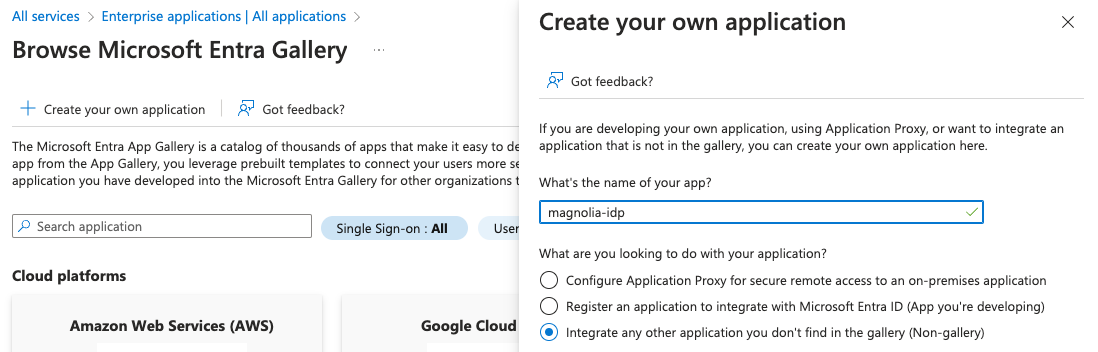
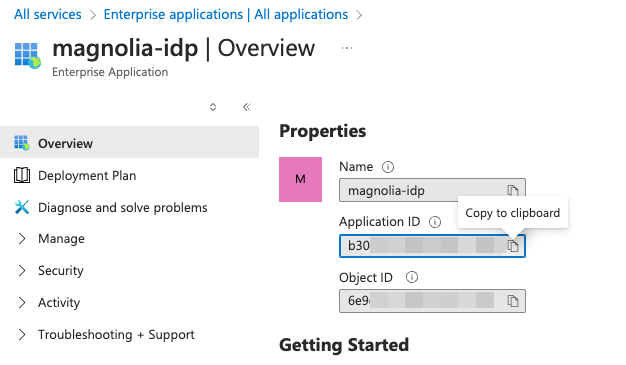
-
Navigate to App Registrations and find your recently created application and open it.
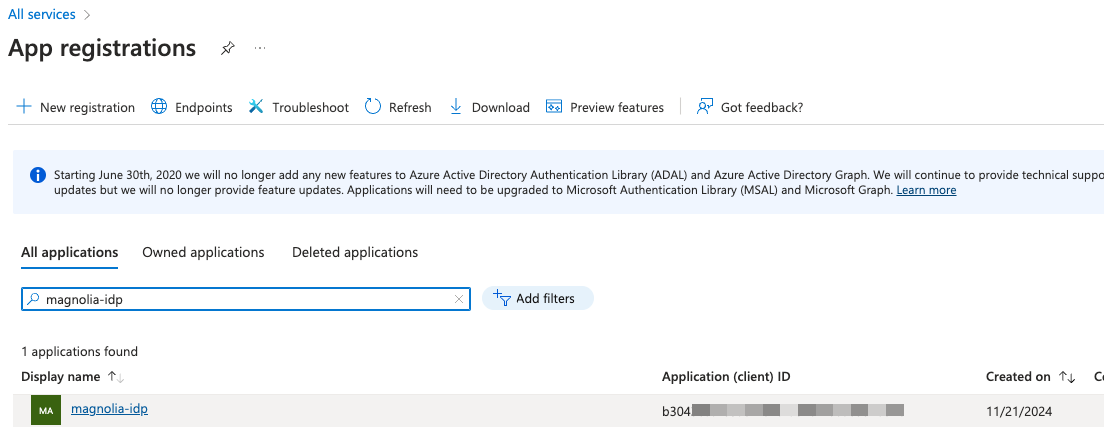
-
In Manage > Certificates & Secrets, create a
Client Secretand copy down the newSecret Value(Secret IDis not required).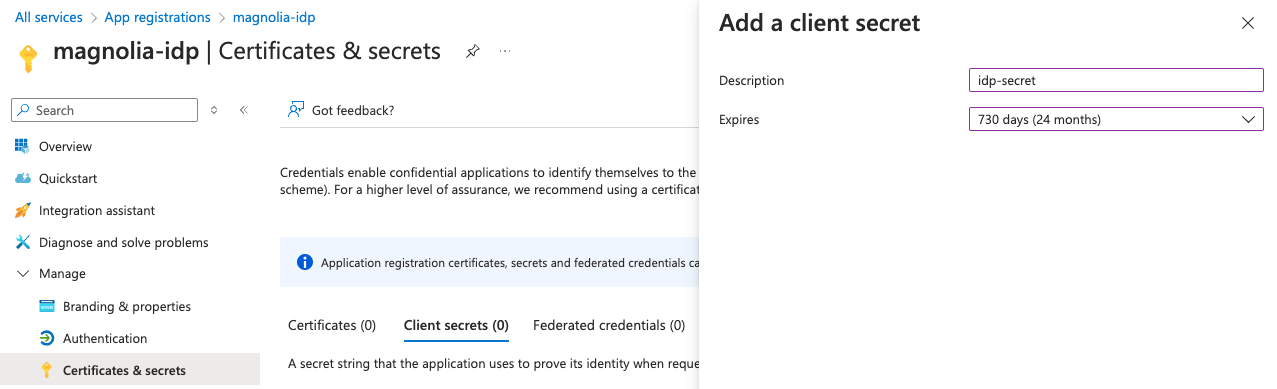

-
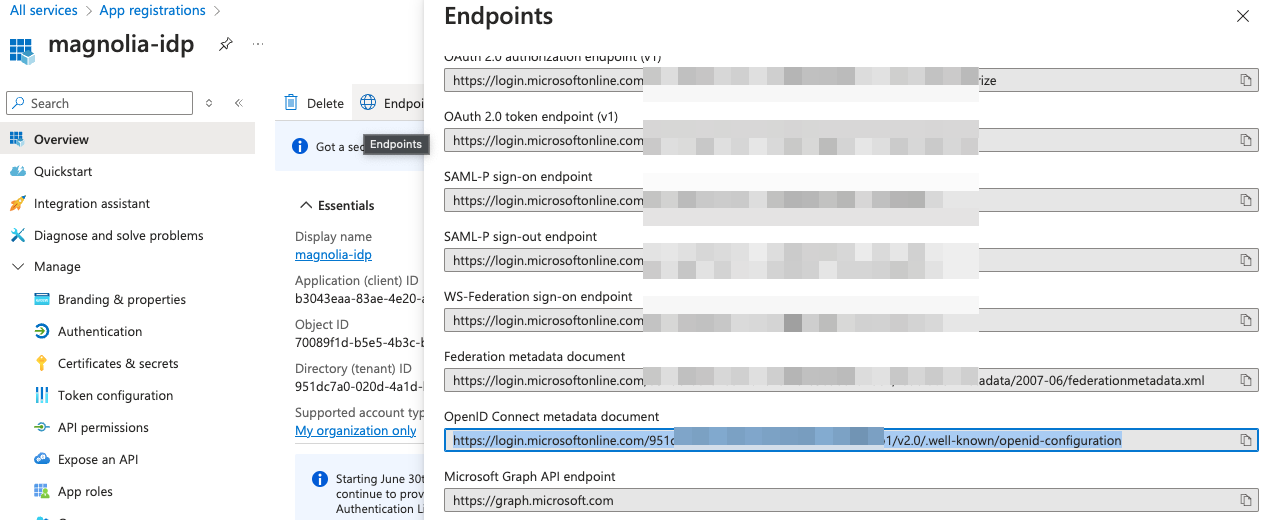
In App Registrations on the newly created app, open Overview > Endpoints and note the OpenID Metadata Document URL of the new Application.
-
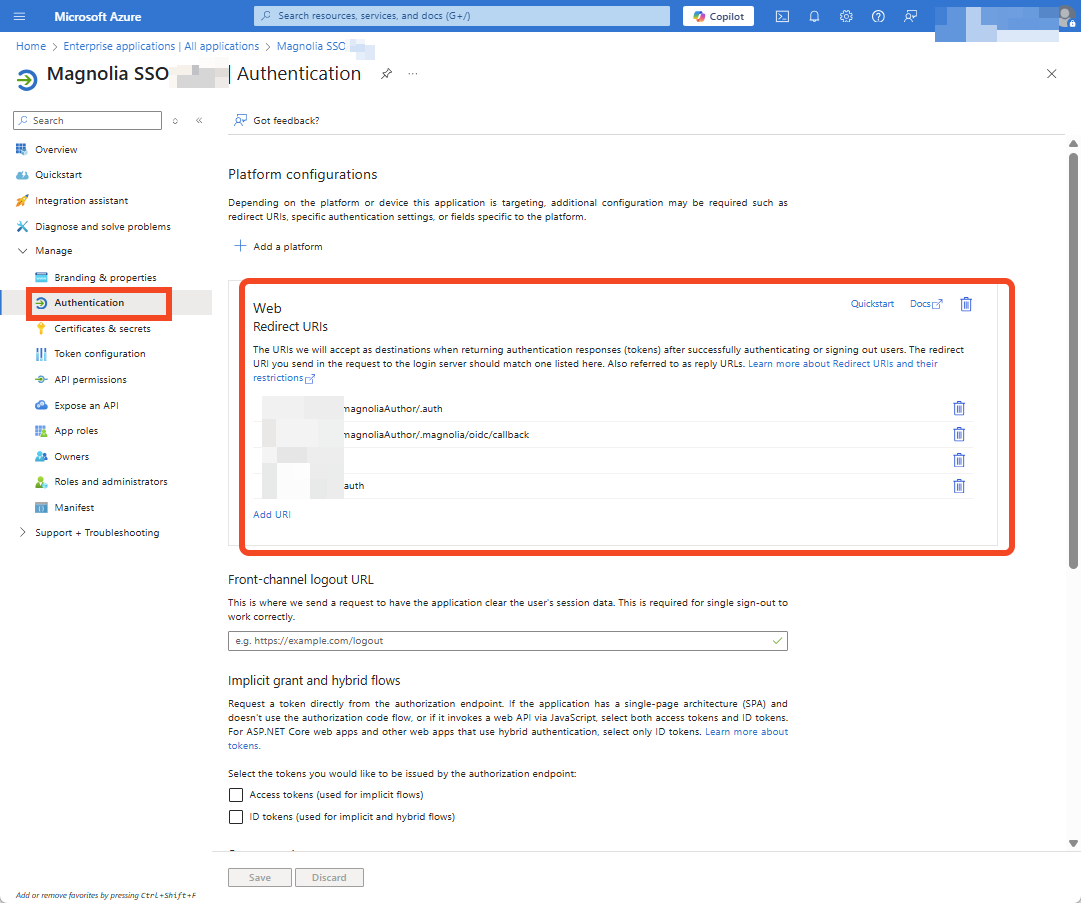
Finally, in the Authentication section of the App Registration, add the Magnolia Keycloak URLs as
valid redirect URIs(PlatformWeb). Please enter them in the following format (replace<customer>with your customer shortname):- EMEA:
https://id.eu-central.magnolia-platform.com/realms/<customer>/broker/oidc/endpoint - APAC:
https://id.ap-southeast.magnolia-platform.asia/realms/<customer>/broker/oidc/endpoint - US:
https://id.us-east.magnolia-platform.us/realms/<customer>/broker/oidc/endpoint
- EMEA:
Keycloak
-
In the
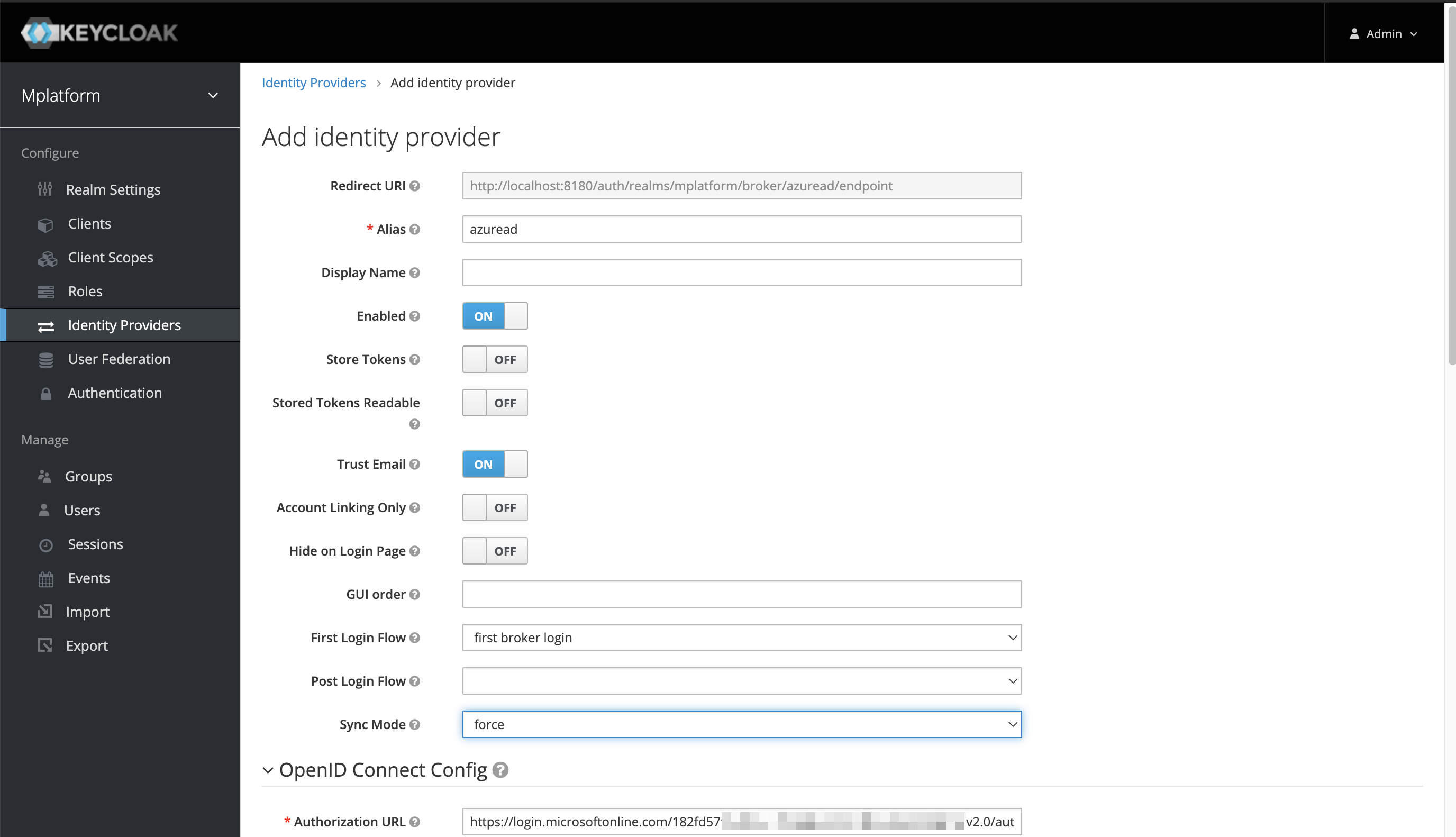
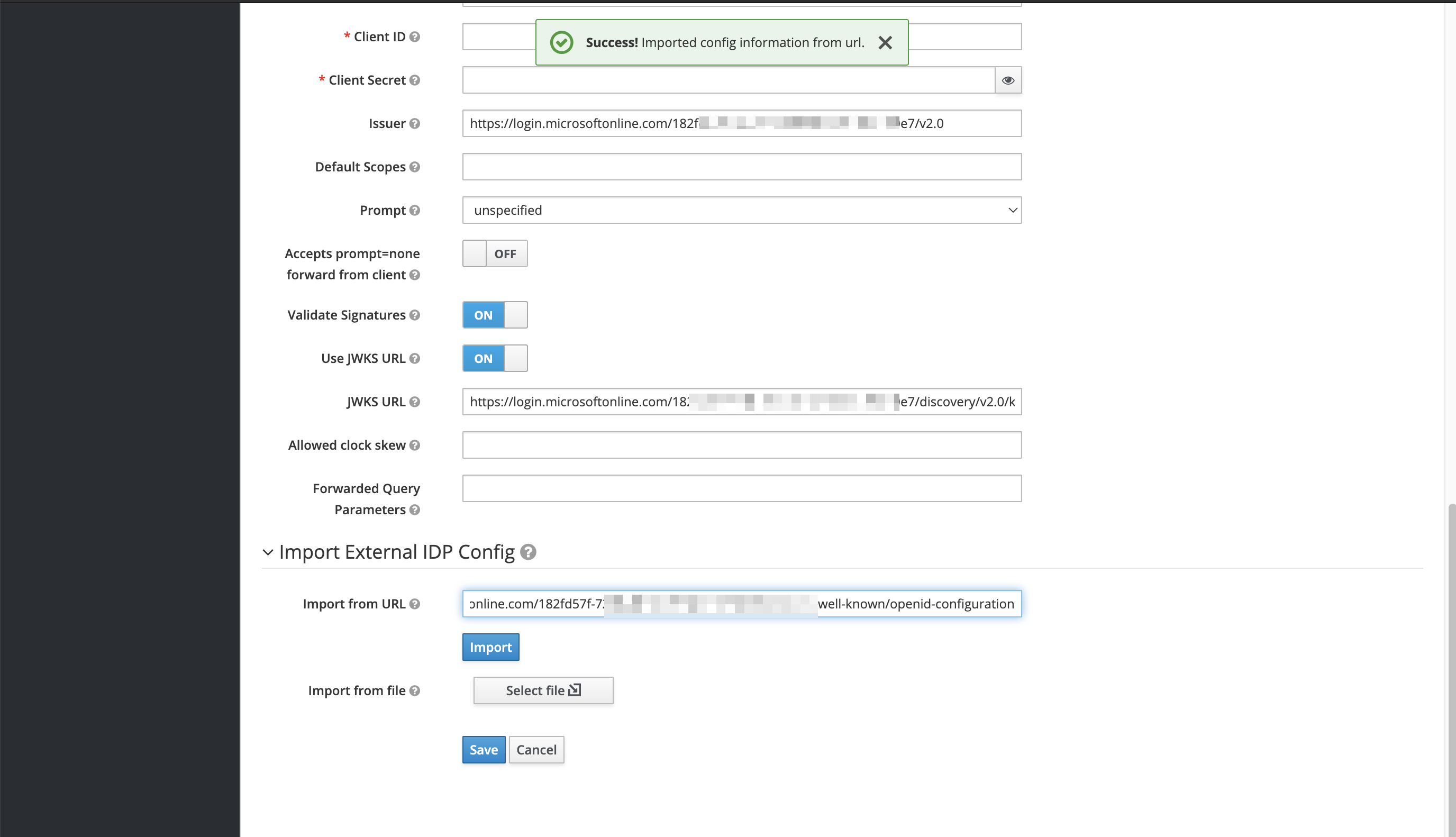
<customer>realm under Identity Providers, create a new IdP Integration using the information received before.Client ID(Application ID)Client Secret(Application SecretSecret Value)Well-Known URL(OpenID Metadata Document URL including all necessary information)
Fetch OIDC metadata to “autofill” basic Information
-
For the
ClientID, enter the Azure App’sApplicationID. -
For the
ClientSecret, enter Azure App’sSecret Value.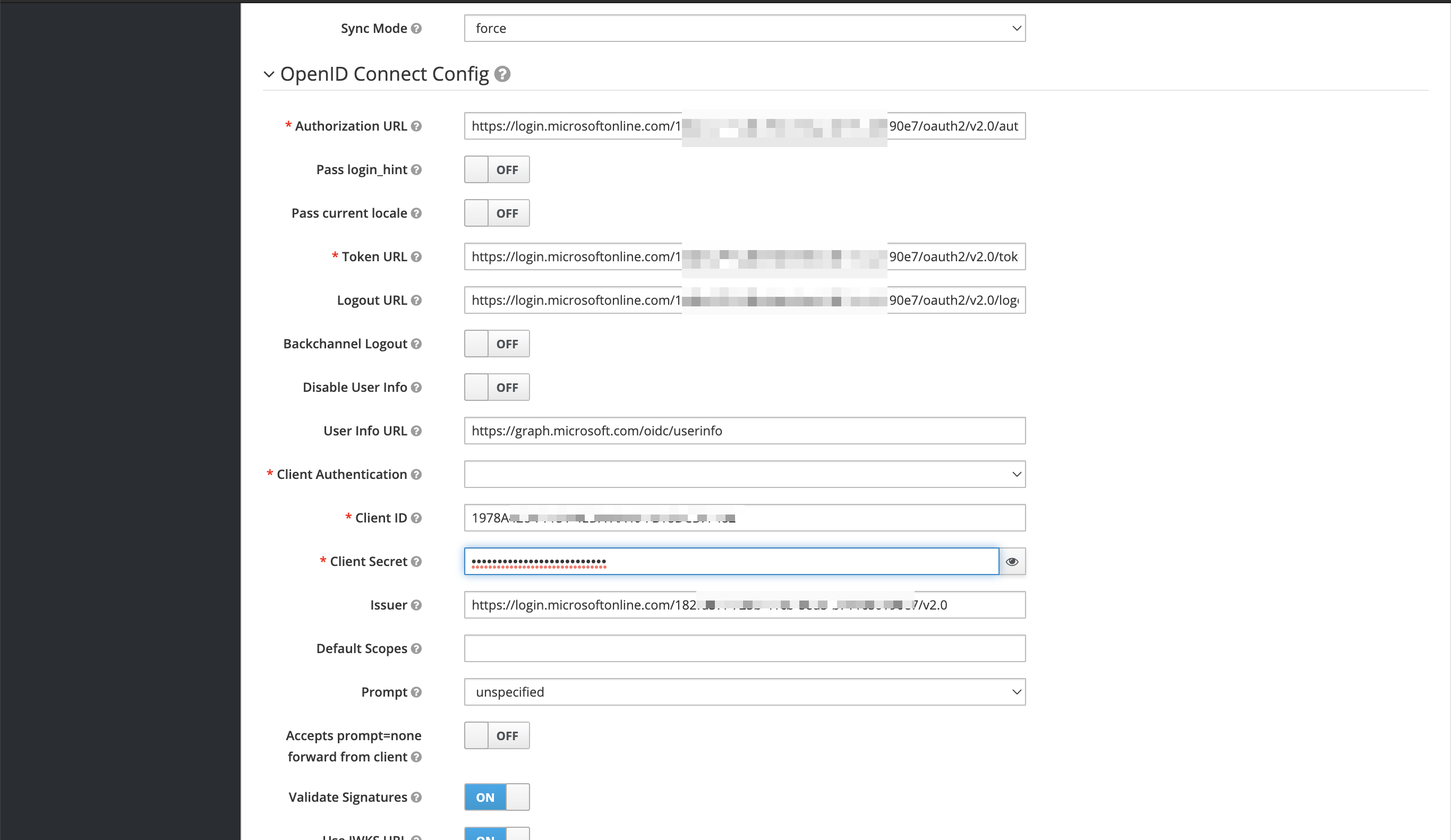
-
Perform a basic Test on Realm ID.
-
Prepare
RoleMapping(Map OpenID “roles” to existing keycloak roles).
App mapping
Azure
IdP naming and structure for groups, users, roles, and assignments are flexible, so it’s important for SSO to align and match on certain role assignments to control granular access privileges.
Aligning Claim-Value with the Group name in both Keycloak and Azure AD helps to avoid any confusion or misconfiguration.
Use the DX Cloud groups to prepare an IdP for onboarding with DX Cloud Keycloak.
-
In App Registrations of your app, create your desired
AppRole(ie. Magnolia, Cockpit, Rancher) to be delivered as an OIDC Claim Value (Value=Claim Valuein Keycloak).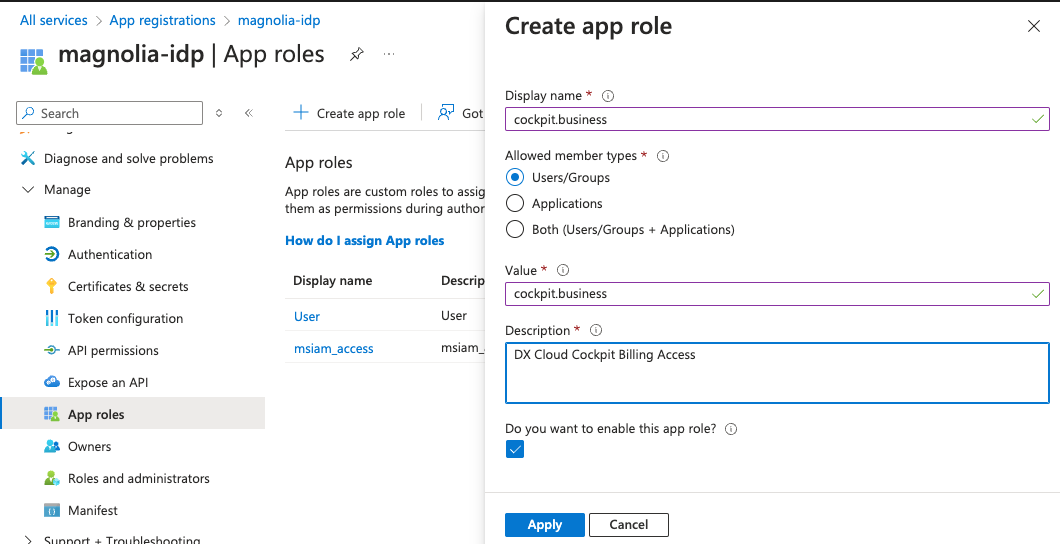
-
In (Enterprise) Application, map the
AppRoleon a User and/or Group Level in Azure AD.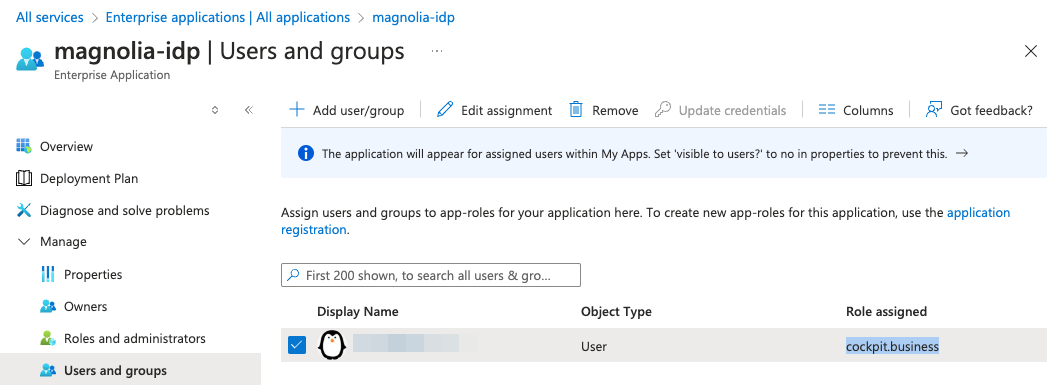
authorizationGenerators:
  - name: groupsAuthorization
    groups:
      targetProperty: magnolia-roles <1>
...
targetProperty maps to the groups in your IDP for the SSO module.
See SSO module: Configuring via yaml for more details.
Keycloak
-
In
<customer>> Identity Providers > Mappers, mapClaim Value(set before in Azure asAppRole) of the OIDC Token Claimrolesto the existingRolein Keycloak IdP.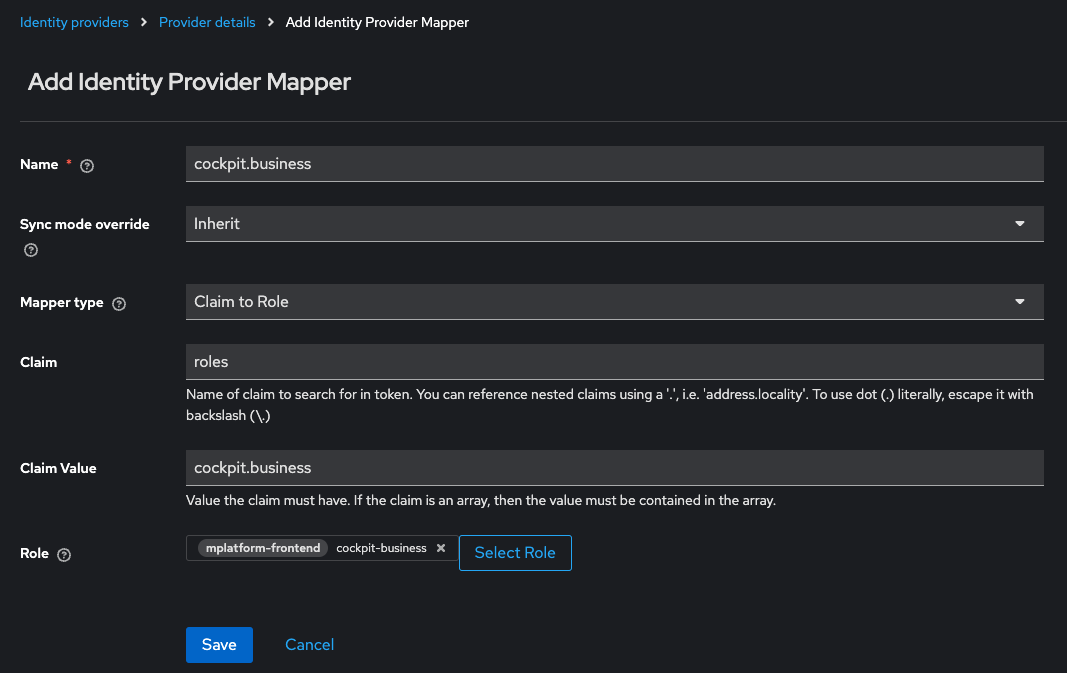
Repeat the steps of App mapping per Application you want to integrate. For more information on installing and configuring the SSO Module and securing Magnolia Admincentral Access, check out the SSO module.
Further reading
- Microsoft: Add app roles and receive them in the token.
- Microsoft: Azure App Registration.
- External: Microsoft Azure Step-by-step.
Set sameSiteCookies to lax
In your Tomcat configuration, make sure that the CookieProcessor component does not have the sameSiteCookies property set to strict.
Instead, set the property to Lax:
Tomcat
<CookieProcessor sameSiteCookies="Lax" /> <1>sameSiteCookies set to Lax instead of strict.
Modify values.yml
To modify sameSiteCookies, update your values.yml file.
values.yml
magnoliaAuthor:
  sameSiteCookies: Lax <1>
sameSiteCookies set to Lax instead of strict.
Integrate SSO in DX Cloud PaaS
This section covers Single Sign-On (SSO) in the DX Cloud PaaS environment with Azure Active Directory (AD). Work through the sections in order: Magnolia prerequisites, Azure AD, Magnolia SSO config for Azure (including Helm secrets), then debugging and troubleshooting if needed. When each instance uses the same SSO identity provider, users can log in once and access multiple instances without re-authentication.
Magnolia prerequisites
Configure JAAS
Configure JAAS in your webapp bundle.
WEB-INF/config/jaas.config
magnolia {
  info.magnolia.jaas.sp.jcr.JCRAuthenticationModule requisite;
  info.magnolia.jaas.sp.jcr.JCRAuthorizationModule required;
};

sso-authentication {
  info.magnolia.sso.jaas.SsoAuthenticationModule requisite;
  info.magnolia.jaas.sp.jcr.JCRAuthorizationModule required;
};
Add the SSO config YAML
Add the SSO config yaml in the right place.
- The default location is:
<light-modules>/magnolia-sso/config.yaml. - Ensure that you set the
magnolia.sso.configproperty to an existing value.
Set sameSiteCookies to Lax
Your sameSiteCookies setting is strict by default in PaaS. You must set it to Lax when using SSO (<CookieProcessor sameSiteCookies="Lax" />).
See Modify values.yml for more details.
values.yaml
magnoliaAuthor:
  sameSiteCookies: Lax
Configure Azure AD
When integrating with an identity and access management (IAM) service such as Azure, configure your Identity Provider (IdP) as follows.
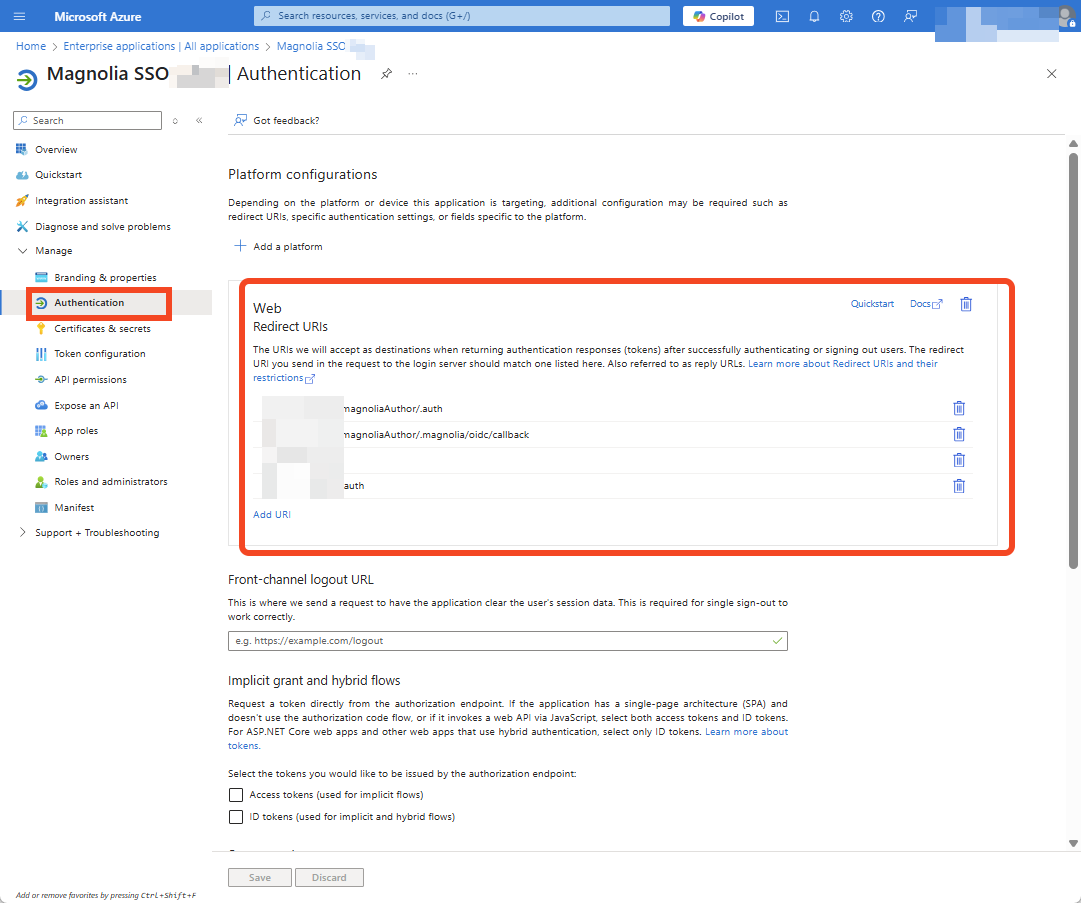
Redirect URLs
Configure redirect URLs.
Assign groups to your client
Assign groups to your client.
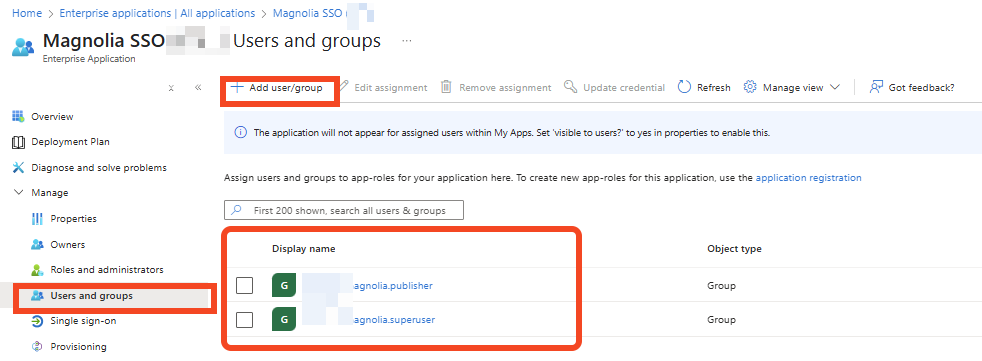
Prepare group mappings
Example mapping: Azure display name | Magnolia roles | Magnolia groups | Azure Group Object ID → magnolia.superuser | superuser | publisher | 6c1c2684-78aa-4fd5-a976-abc.
Given that mapping, your configuration is as follows:
- name: groupsAuthorization
    groups:
      mappings:
        - name: 6c1c2684-78aa-4fd5-a976-abc #magnolia.superuser
          targetRoles:
            - superuser
          targetGroups:
            - publisher
Choose group authorization
Pick one of the following approaches.
Option 1: Groups claim in the access token
Allow groups claim in the access token.
-
Configure groups to be returned in the access token.
See the SSO module prerequisites for the Azure groups-claim configuration screenshot and steps.
-
Configure authorizationGenerators in your SSO
config.yaml. This defines the groups and roles for your client. They are needed for groups and fixed role generators. If you want a custom generator, follow the steps here.
callbackUrl: /.auth
postLogoutRedirectUri: http://localhost:8080
authorizationGenerators:
  - name: groupsAuthorization
    groups:
      targetProperty: groups
      mappings:
        - name: superusers
          targetGroups:
            - publishers
          targetRoles:
            - superuser
Option 2: Custom group authentication
Include this custom group authentication.
Magnolia SSO config for Azure
Azure OIDC client settings
Check your existing SSO config and include oidc.type: azure and oidc.azure.tenant: <azureTenantId>.
Example SSO config
callbackUrl: /.auth
authorizationGenerators:
  - name: fixedRoleAuthorization
    fixed:
      targetRoles:
        - superuser

clients:
  oidc.type: azure <1>
  oidc.azure.tenant: <azureTenantId> <2>
  oidc.id: !env ${SSO_OIDCID}
  oidc.secret: !env ${SSO_OIDCSECRET}
  oidc.clientAuthenticationMethod: client_secret_post
  oidc.scope: openid profile email
  oidc.discoveryUri: https://login.microsoftonline.com/<azureTenantId>/v2.0/.well-known/openid-configuration
  oidc.preferredJwsAlgorithm: RS256
  oidc.authorizationGenerators: fixedRoleAuthorization
userFieldMappings:
  name: name
  removeEmailDomainFromUserName: true
  removeSpecialCharactersFromUserName: false
  fullName: name
  email: email
  language: locale
Add oidc.type: azure.
Add oidc.azure.tenant: <azureTenantId>.
Hide client credentials in Helm values
If you want to hide client credentials from the configuration file, enable them as catalinaExtraEnv for both author and public instances in your Helm values.yaml file.
magnoliaAuthor:
  env:
    - name: SSO_OIDCID
      value: {{ .Env.SSO_OIDCID | quote }}
    - name: SSO_OIDCSECRET
      value: {{ .Env.SSO_OIDCSECRET | quote }}
    - name: SSO_POST_LOGOUT_URI
      value: {{ .Env.SSO_POST_LOGOUT_URI | quote }}
    - name: SSO_CALLBACK_URL
      value: {{ .Env.SSO_CALLBACK_URL | quote }}
  catalinaExtraEnv:
    magnolia.yaml.envsubst: "true"
Debugging
Enable DEBUG in Log Tools
Log in with a Magnolia account and navigate to the Log Tools app.
Set these loggers to DEBUG.
These settings reset upon pod restart.
info.magnolia.sso: DEBUGorg.pac4j: DEBUGcom.nimbusds: DEBUG
Persist DEBUG in values.yaml
Set the same loggers in your values.yaml and redeploy.
magnoliaAuthor:
  logging:
    loggers:
      - name: info.magnolia.sso
        level: DEBUG
      - name: org.pac4j
        level: DEBUG
      - name: com.nimbusds
        level: DEBUG
Change loggers via ConfigMap (without redeploy)
Alternatively, edit the configmap (for example, dev-configmap-author) without redeploying:
-
Edit YAML in ConfigMaps.

-
Scroll down to
log4j.xmland paste the loggers.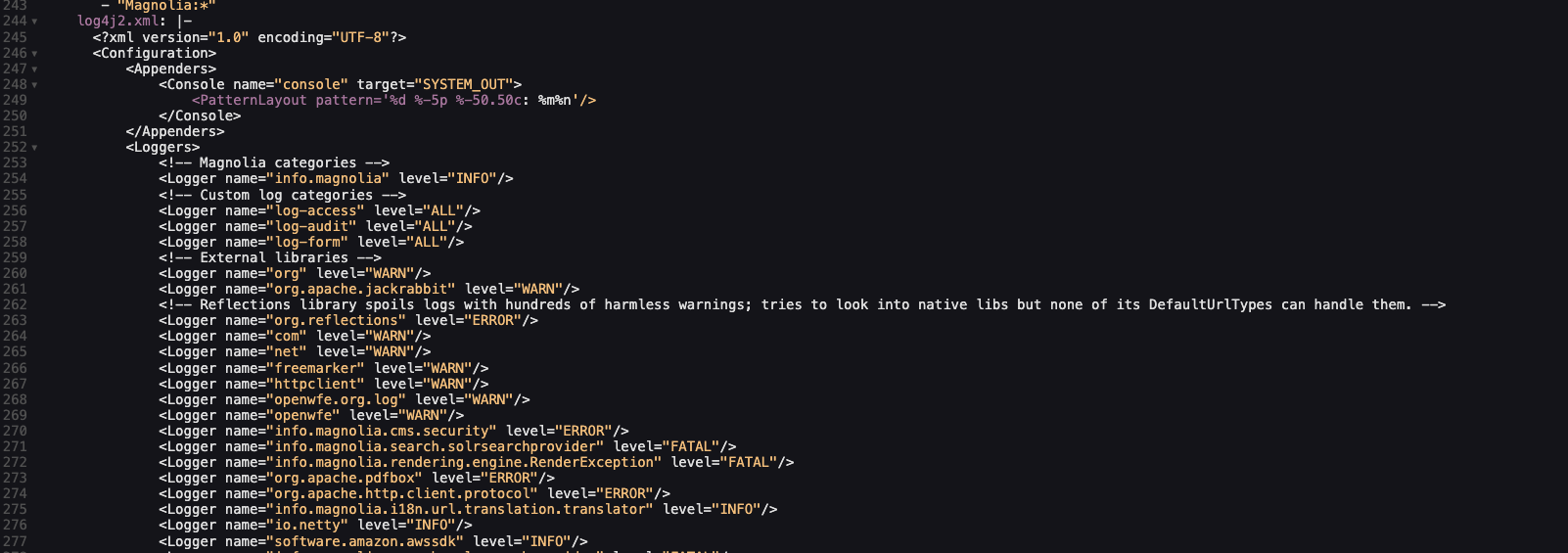
-
Restart your pod.
Troubleshooting
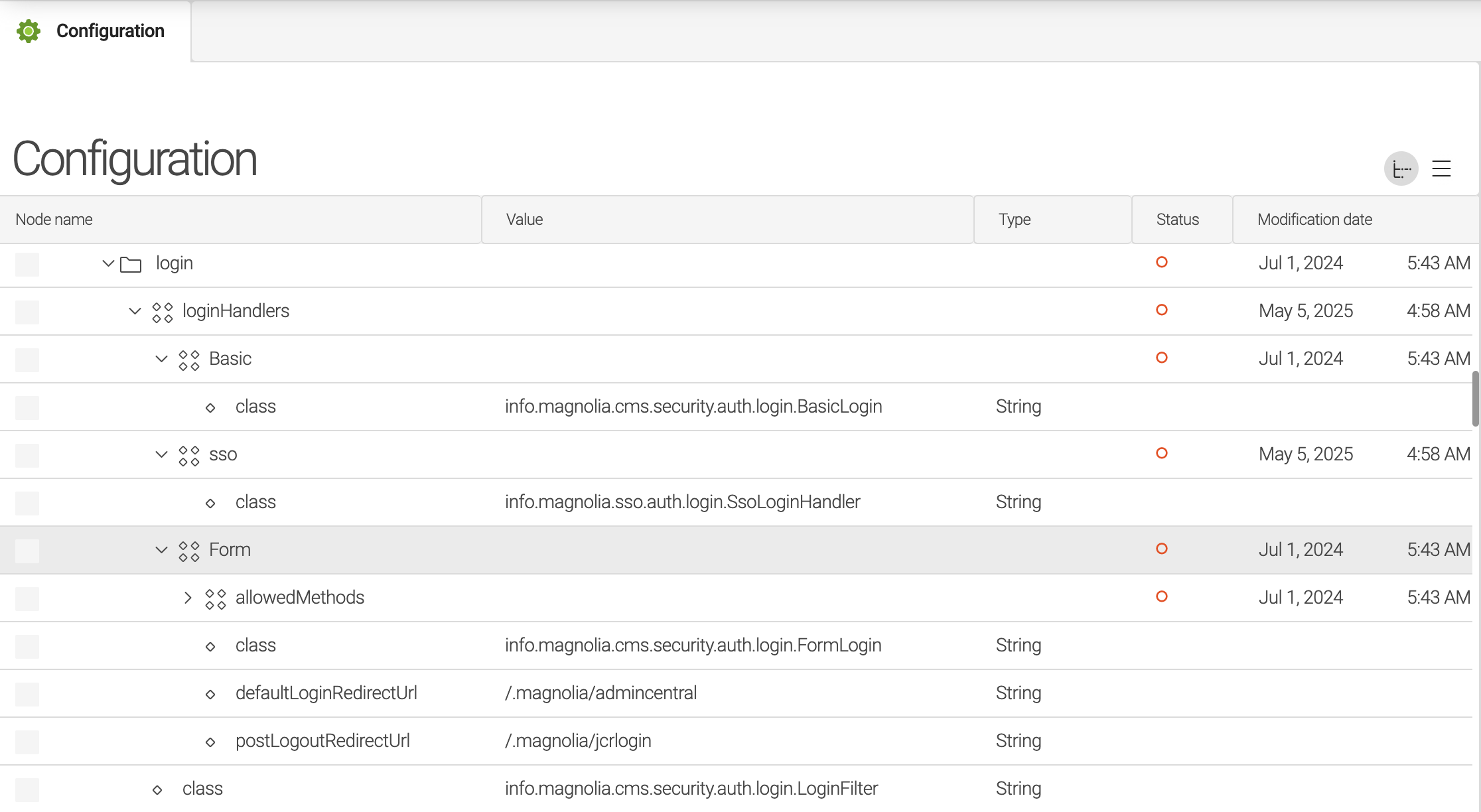
Make sure these configs are available and in the correct order.
Login handlers
/server/filters/login/loginHandlers from SSO 4.x (class: info.magnolia.cms.security.auth.login.LoginFilter):
/server/filters/login/loginHandlers/Basic/class=info.magnolia.cms.security.auth.login.*BasicLogin*/server/filters/login/loginHandlers/sso/class=info.magnolia.sso.auth.login.*SsoLoginHandler*/server/filters/login/loginHandlers/Form/class=info.magnolia.cms.security.auth.login.*FormLogin*
Logout handlers
/server/filters/logout from SSO 4.x (class: info.magnolia.cms.security.LogoutFilter):
/server/filters/logout/handlers/extends=../../login/loginHandlers

Security callback clientCallbacks
/server/filters/securityCallback/clientCallbacks:
/server/filters/securityCallback/clientCallbacks/ssoFallback/class=info.magnolia.cms.security.auth.callback.*FormClientCallback*/server/filters/securityCallback/clientCallbacks/ssoLocationFragmentRedirect/class=info.magnolia.sso.*LocationFragmentRedirectClientCallback*/server/filters/securityCallback/clientCallbacks/sso/class=info.magnolia.sso.*UserInitiatedRedirectClientCallback*/server/filters/securityCallback/clientCallbacks/form/class=info.magnolia.cms.security.auth.callback.*FormClientCallback*

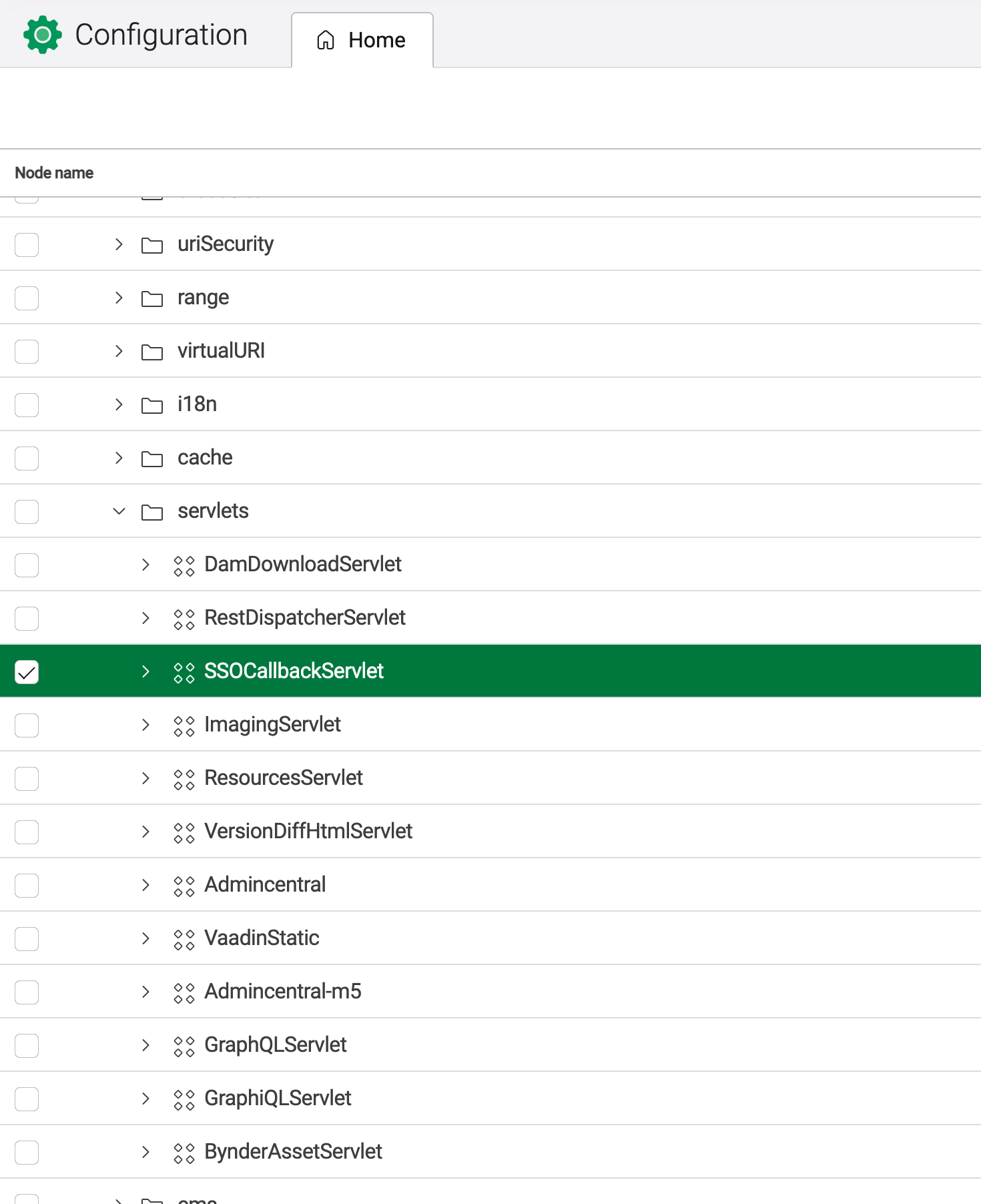
SSOCallbackServlet
Order of /server/filters/servlets/SSOCallbackServlet:
/server/filters/servlets/SSOCallbackServlet/servletClass=info.magnolia.sso.SsoCallbackServlet/server/filters/servlets/SSOCallbackServlet/mappings/-.auth/pattern=/.auth
User managers
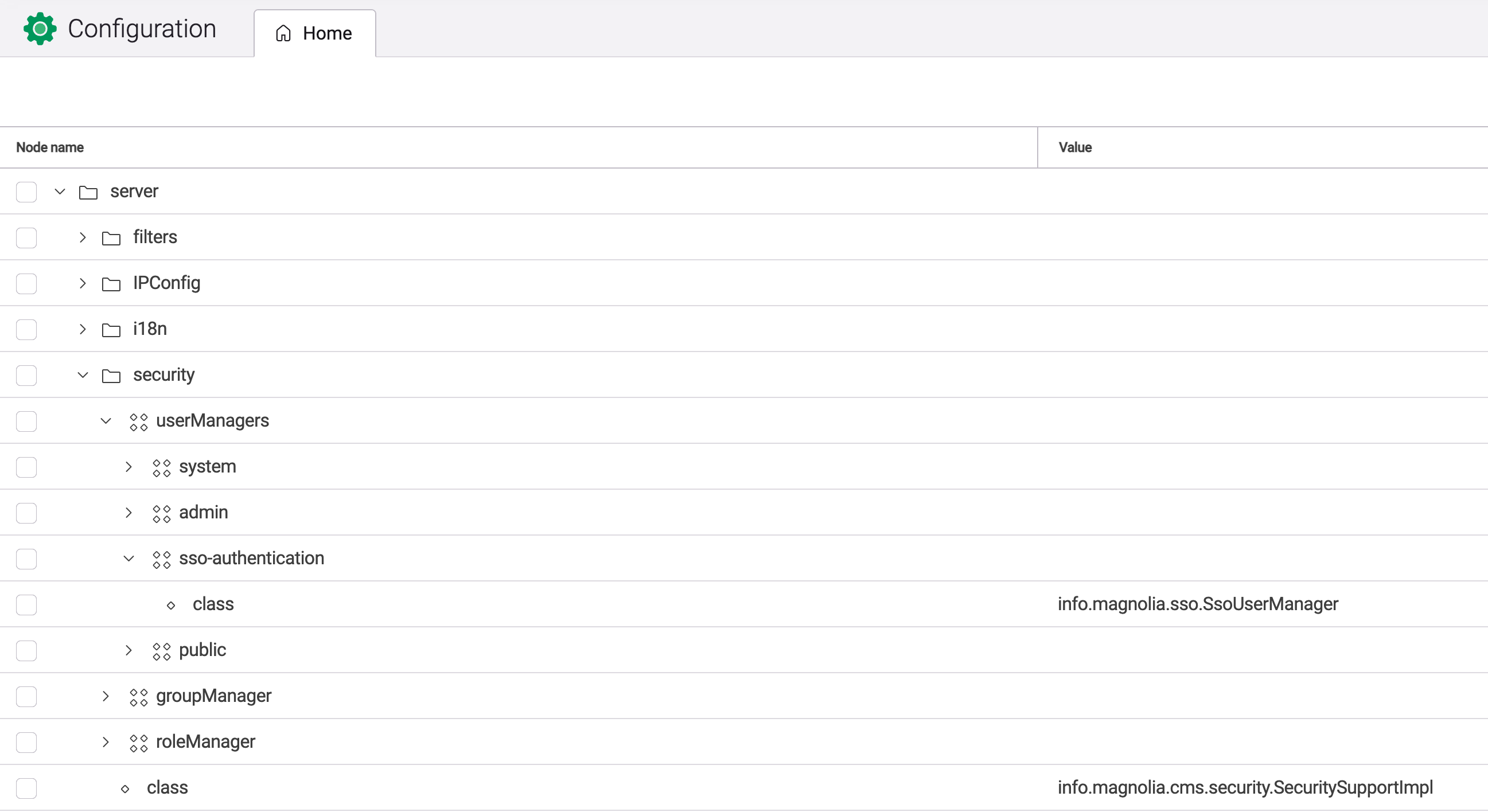
/server/security/userManagers:
/server/security/userManagers/system/class=info.magnolia.cms.security.*SystemUserManager*/server/security/userManagers/admin/class=info.magnolia.cms.security.*MgnlUserManager*/server/security/userManagers/sso-authentication/class=info.magnolia.sso.*SsoUserManager*
Groovy check script
Use the Groovy script below to check the values.
import info.magnolia.jcr.util.NodeUtil

session = MgnlContext.getJCRSession("config");
println("--callbacks")
clientCallbacks = session.getNode("/server/filters/securityCallback/clientCallbacks");
print(info.magnolia.cms.util.DumperUtil.dump(clientCallbacks, 3));
println("--login")
login = session.getNode("/server/filters/login/loginHandlers");
print(info.magnolia.cms.util.DumperUtil.dump(login, 3));

println("--logout")
logout = session.getNode("/server/filters/logout");
print(info.magnolia.cms.util.DumperUtil.dump(logout, 3));

println("--callbackServlet")
callbackServlet = session.getNode("/server/filters/servlets/SSOCallbackServlet");
print(info.magnolia.cms.util.DumperUtil.dump(callbackServlet, 3));

println("--userManagers")
userManagers = session.getNode("/server/security/userManagers");
print(info.magnolia.cms.util.DumperUtil.dump(userManagers, 3));

println("--sso version")
session = MgnlContext.getJCRSession("config");
ssoVersion = session.getNode("/modules/sso");
print(info.magnolia.cms.util.DumperUtil.dump(ssoVersion, 3));
Multisite site definition
For public instances, SSO can be triggered on the main domain because of a missing multisite configuration. Define your site definition as follows.
domains:
  example:
    name: example.com
  example-dev:
    name: test-dev.public.magnolia-platform.io

mappings:
  website:
    URIPrefix: ''
    handlePrefix: /example
    repository: website
Logout example
Logout example without postLogoutRedirectUri in your SSO config.yaml.
Successful logout
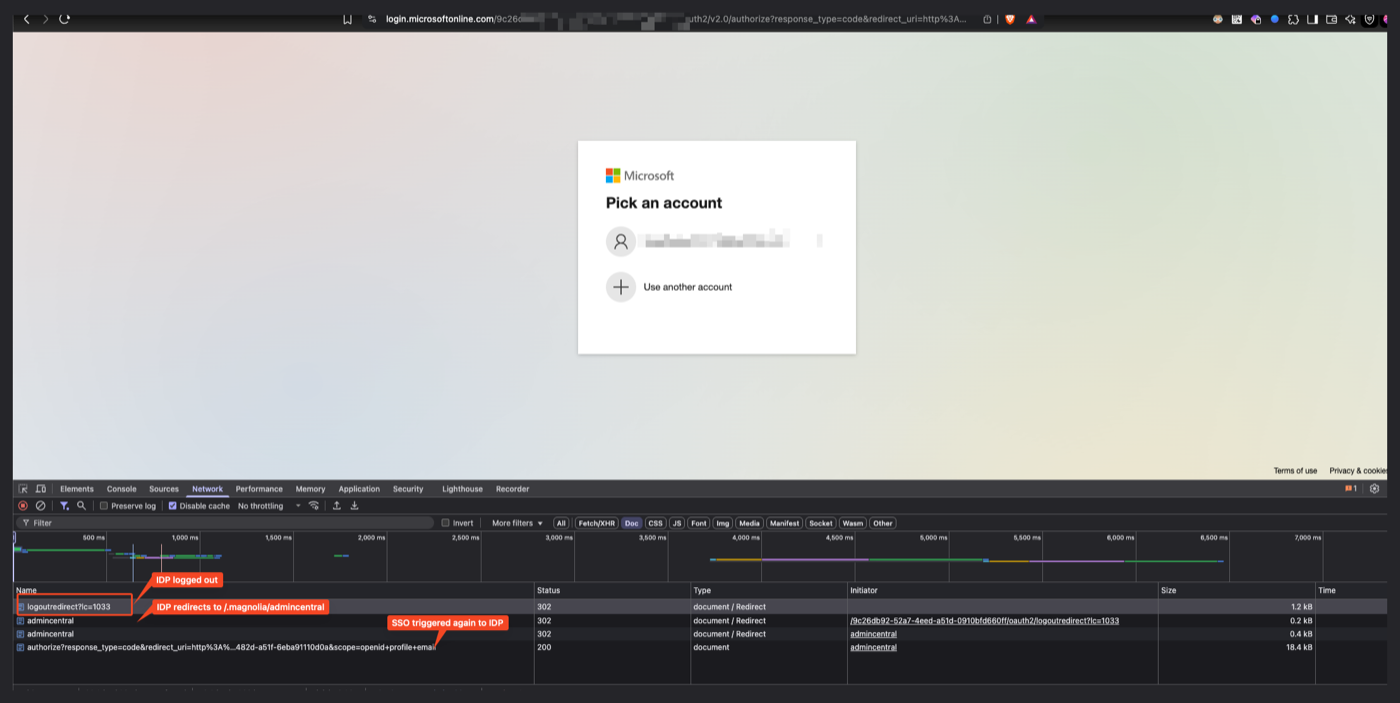
Console log for a successful logout
2025-06-12 13:12:50,315 DEBUG org.pac4j.core.engine.DefaultLogoutLogic          : redirectUrl: http://localhost:8585/.magnolia/admincentral
2025-06-12 13:12:50,315 DEBUG org.pac4j.core.engine.DefaultLogoutLogic          : Performing application logout
2025-06-12 13:12:50,315 DEBUG org.pac4j.jee.context.session.JEESessionStore     : createSession: false, retrieved session: org.apache.catalina.session.StandardSessionFacade@14f1e877
2025-06-12 13:12:50,315 DEBUG org.pac4j.jee.context.session.JEESessionStore     : Get sessionId: F00762317C5AF70DFFA29B051B8B3046
2025-06-12 13:12:50,315 DEBUG org.pac4j.core.profile.ProfileManager             : Removing profiles from session
2025-06-12 13:12:50,315 DEBUG org.pac4j.jee.context.session.JEESessionStore     : createSession: true, retrieved session: org.apache.catalina.session.StandardSessionFacade@14f1e877
2025-06-12 13:12:50,315 DEBUG org.pac4j.jee.context.session.JEESessionStore     : Set key: pac4jUserProfiles for value: {}
2025-06-12 13:12:50,315 DEBUG org.pac4j.core.profile.ProfileManager             : Removing profiles from request
2025-06-12 13:12:50,315 DEBUG org.pac4j.jee.context.session.JEESessionStore     : createSession: false, retrieved session: org.apache.catalina.session.StandardSessionFacade@14f1e877
2025-06-12 13:12:50,315 DEBUG org.pac4j.jee.context.session.JEESessionStore     : Invalidate session: org.apache.catalina.session.StandardSessionFacade@14f1e877
2025-06-12 13:12:50,315 DEBUG org.pac4j.core.engine.DefaultLogoutLogic          : Performing central logout
2025-06-12 13:12:50,316 DEBUG org.pac4j.core.engine.DefaultLogoutLogic          : Profile: #AzureAdProfile# | id: QZwkH..IVRKjMSTcU0O4 | attributes: {sub=QZwkHnvFW...IVRKjMSTcU0O4, xms_pl=en, iss=https://login.microsoftonline.com/123-52a7-4eed-a51d-/v2.0, oid=6ef8238b-2e7b-45f7-afbe-18cb3b15ab28, preferred_username=123@outlook.com, acrs=[p1], tid=123-52a7-4eed-a51d-0910bfd660ff, sid=005d6a29-4dac-dbf6-0525-3f8bea6576a7, login_hint=O.CiQwMDAwMDAwMC0wMDAwLTAwMDAtMDRkYy1mYWM3NDg2MDcwZjcSJDkxODgwNDBkLTZjNjctNGM1Yi1iMTEyLTM2YTMwNGI2NmRhZBocZG9uZ2FuaGhhbm9pMTExMEBvdXRsb29rLmNvbSAp, ctry=VN, auth_time=Thu Jun 12 13:12:44 ICT 2025, exp=Thu Jun 12 14:12:44 ICT 2025, ipaddr=45.126.93.146, iat=Thu Jun 12 13:07:44 ICT 2025, email=123@outlook.com, mgnlGroups=[swissre-admin], ver=2.0, xms_tpl=en, id_token=A, tenant_ctry=VN, token_expiration_advance=0, aud=[7b3a95d7-1573-482d-a51f-6eba91110d0a], tenant_region_scope=AS, nbf=Thu Jun 12 13:07:44 ICT 2025, idp=https://sts.windows.net/9188040d-6c67-4c5b-b112-36a304b66dad/, rh=1.AXAAktsmnKd..RDQpwAHlwAA., name=Minh Anh, expiration=1749713137608, family_name=Anh, acct=0} | authenticationAttributes: {} | roles: [rest-admin, swissre-admin] | permissions: [] | isRemembered: false | clientName: AzureAd2Client | linkedId: null |
2025-06-12 13:12:50,316 DEBUG org.pac4j.core.client.Clients                     : Found client: #AzureAd2Client# | name: AzureAd2Client | callbackUrl: /.auth | callbackUrlResolver: org.pac4j.core.http.callback.NoParameterCallbackUrlResolver@d260613 | ajaxRequestResolver: org.pac4j.core.http.ajax.DefaultAjaxRequestResolver@64bbd2c9 | redirectionActionBuilder: org.pac4j.oidc.redirect.OidcRedirectionActionBuilder@28c07808 | credentialsExtractor: org.pac4j.oidc.credentials.extractor.OidcExtractor@200c6fc | authenticator: org.pac4j.oidc.credentials.authenticator.OidcAuthenticator@3fab5e31 | profileCreator: org.pac4j.oidc.profile.azuread.AzureAdProfileCreator@53cee97 | logoutActionBuilder: org.pac4j.oidc.logout.OidcLogoutActionBuilder@2e17c600 | authorizationGenerators: [info.magnolia.sso.oidc.FixedRoleAuthorizationGenerator@2aa4c218] | configuration: #AzureAd2OidcConfiguration# | clientId: 7b3a95d7-1573-482d-a51f-6eba91110d0a | secret: [protected] | discoveryURI: https://login.microsoftonline.com/123-52a7-4eed-a51d-0910bfd660ff/v2.0/.well-known/openid-configuration | scope: openid profile email | customParams: {} | clientAuthenticationMethod: client_secret_post | useNonce: false | preferredJwsAlgorithm: RS256 | maxAge: null | maxClockSkew: 30 | connectTimeout: 500 | readTimeout: 5000 | resourceRetriever: org.pac4j.oidc.client.azuread.AzureAdResourceRetriever@4f9b4bab | responseType: code | responseMode: null | logoutUrl: null | withState: true | stateGenerator: org.pac4j.core.util.generator.RandomValueGenerator@2db15c99 | logoutHandler: #DefaultLogoutHandler# | store: #GuavaStore# | size: 10000 | timeout: 30 | timeUnit: MINUTES | | destroySession: false | | tokenValidator: org.pac4j.oidc.profile.azuread.AzureAdTokenValidator@3d86b8e9 | mappedClaims: {} | allowUnsignedIdTokens: false | SSLFactory: null | privateKeyJWTClientAuthnMethodConfig: null | callUserInfoEndpoint: true | | for name: AzureAd2Client
2025-06-12 13:12:50,316 DEBUG org.pac4j.core.engine.DefaultLogoutLogic          : Logout action: Optional[#FoundAction# | code: 302 | location: https://login.microsoftonline.com/123-52a7-4eed-a51d-/oauth2/v2.0/logout?post_logout_redirect_uri=http%3A%2F%2Flocalhost%3A8585%2F.magnolia%2Fadmincentral&id_token_hint=eyJ0eXA |]
2025-06-12 13:12:50,316 DEBUG info.magnolia.sso.auth.login.SsoLoginHandler      : Logout from IdP executed, session should have been removed from the server.
2025-06-12 13:12:50,316 INFO  info.magnolia.audit.AuditLoggingManager           : [Audit] logout, Minh Anh
2025-06-12 13:12:50,316 DEBUG info.magnolia.sso.auth.login.SsoLoginHandler      : Magnolia user session has been removed.
2025-06-12 13:12:50,416 DEBUG agnolia.sso.LocationFragmentRedirectClientCallback: Remember location fragment feature is disabled.
2025-06-12 13:12:50,416 DEBUG info.magnolia.sso.pac4j.SecFetchMode              : Sec-Fetch-Mode: no-cors
2025-06-12 13:12:57,035 DEBUG agnolia.sso.LocationFragmentRedirectClientCallback: Remember location fragment feature is disabled.
2025-06-12 13:12:57,035 DEBUG info.magnolia.sso.pac4j.SecFetchMode              : Sec-Fetch-Mode: navigate
2025-06-12 13:12:57,035 DEBUG o.magnolia.sso.UserInitiatedRedirectClientCallback: Attempting to redirect to: http://localhost:8585/.magnolia/admincentral
2025-06-12 13:12:57,035 DEBUG o.magnolia.sso.UserInitiatedRedirectClientCallback: Redirect successful to: http://localhost:8585/.magnolia/admincentral
2025-06-12 13:12:57,038 DEBUG info.magnolia.sso.auth.login.SsoLoginHandler      : SSO login handler.
2025-06-12 13:12:57,038 DEBUG org.pac4j.core.engine.DefaultSecurityLogic        : === SECURITY ===
2025-06-12 13:12:57,038 DEBUG org.pac4j.core.engine.DefaultSecurityLogic        : url: http://localhost:8585/.magnolia/admincentral