

Cache coverage
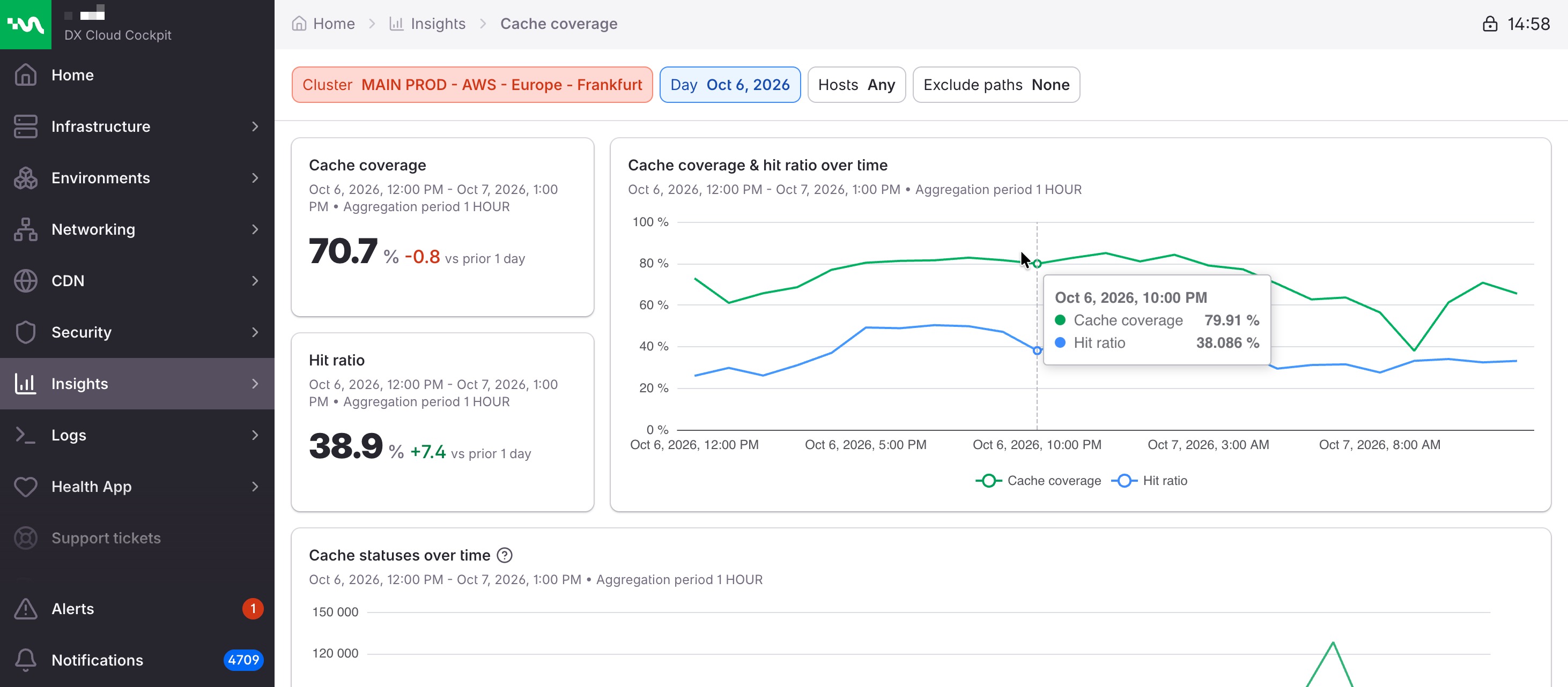
Cache coverage shows, for one day, how much of your CDN traffic can be cached, how much of that cacheable traffic is actually a hit, and which routes explain the numbers. Aggregate coverage and hit ratio also appear on CDN statistics. This page adds the route lists.
The page is available on a cluster that has CDN. On a cluster without CDN, the Cockpit asks you to switch cluster or configure CDN.
Select desired cluster
Select your desired cluster from the dropdown menu at the top of the Cockpit.

Filters
The page opens on the last 24 hours. Refine the view with:
- Day: one calendar day, from local midnight to the next midnight. Cache coverage and Hit ratio then compare with the previous day.
- Hosts: one or more hostnames. The list includes hosts seen on CDN and on ingress. Several hosts split Cache coverage, Hit ratio, and the timeline into one group per host.
- Exclude paths: one or more paths to leave out of the metrics. A path typed without a leading
/is stored with one.
Changing a filter updates the view.
Coverage and hit ratio
These two percentages answer different questions. Both are better when they go up. Each summary shows the value for the selected day (one decimal place) and the change versus the previous period of the same length.
- Cache coverage: the share of requests that were cacheable. A
PASSrequest is not cacheable, so it lowers coverage. - Hit ratio: among requests the cache actually evaluated, the share served from cache (
HIT) rather than fetched from origin (MISS).
A high hit ratio with low coverage means the cache works well on a small slice of traffic. A high coverage with a low hit ratio means most traffic is allowed to cache, but those requests are not being filled from cache.
Cache coverage and hit ratio over time
Cache coverage & hit ratio over time plots both percentages on one timeline for the selected day. With more than one host selected, each host has its own chart.
Cache statuses over time
Cache statuses over time is the mix of cache outcomes across the day. The same chart is on CDN statistics. Select the ? next to the card title in the Cockpit.
HIT: the object was found in the cache.MISS: the object was not in the cache, so the CDN fetched it from origin.PASS: the request was flagged not to be cached and went straight to origin.
How to read a route
Each list below is routes (host plus path). A row has a rate pill and a secondary line.
Hit, on the request and byte lists, is the share of requests that were evaluated against the cache and then hit. Passes are left out of that denominator, because a passed request never had a chance to hit or miss.
Pass is the share of all requests for that route that skipped the cache lookup. A route can show a high hit rate and a high pass rate together: the few requests that were evaluated all hit, while almost everything else bypassed the cache.
| Pill | Hit rate | Pass rate |
|---|---|---|
| Green | 80% or higher | 20% or lower |
| Yellow | 50% or higher, and below 80% | above 20%, through 50% |
| Red | below 50% | above 50% |
On a hit-ranked list, a pass rate of 50% or higher replaces the plain pass figure with a warning: pass - mostly bypasses cache.
Volumes are an average per day over the selected period. On a one-day view, that is the day’s own total.
Cache performance by requests
The routes with the most requests, and how well each one caches.
- Worst paths by requests: busiest routes with the weakest hit rates. The banner is Needs attention.
- Best paths by requests: busiest routes with the strongest hit rates. The banner is Performing well.
Each banner states how many routes are listed, their combined requests per day, and the hit-rate boundary of that list.
Each row shows the host and path, requests per day, and the pass rate (or the bypass warning).
Cache performance by bytes
The routes moving the most bandwidth, and how well each one caches. These lists are ranked by bytes, so a route’s hit rate can sit anywhere from low to high. Read the pill on the row.
- Worst paths by bytes: the banner is Needs attention. It totals bytes per day and notes that a lower hit rate means more of that route’s traffic reaches origin uncached.
- Best paths by bytes: the banner is Performing well. It also notes that a high hit rate does not always tell the whole story, so check the warnings on the rows.
Each row adds a byte split for the day: total, from cache (bytes served as hits), and from origin (everything else, including misses and passes). A bar shows the share of bytes that came from cache. That byte share is separate from the request hit rate on the pill.
Bypassing cache entirely
Routes that never reach the cache lookup. That is a different problem from a low hit ratio, and it stays invisible if you only look at hit ratio.
Worst paths by pass rate ranks routes by pass rate. The banner is Bypassing cache entirely: a high pass rate means these routes skip the cache, and every one of those requests goes straight to origin. The pill on each row is the pass rate (lower is better). The secondary line shows requests per day.
To change what is allowed to cache, see Cache.