

Web Vitals
Web Vitals shows how fast and stable your public site feels in a visitor’s browser. The numbers are Core Web Vitals from real page views: loading, responsiveness, and visual stability. Ingress and CDN traffic analysis keep measuring edge traffic without this. Web Vitals stay empty until your site sends them.
Tabs are Overview, Segments, Geography, Slowest pages, and SDK adoption. Select the ? next to a card title in the Cockpit.
Why these numbers
Edge logs tell you that a request arrived. Web Vitals tell you what the visitor waited through:
- LCP (Largest Contentful Paint): when the main content finished rendering.
- INP (Interaction to Next Paint): how long the page took to respond to a click, tap, or key press.
- CLS (Cumulative Layout Shift): how much the layout jumped while loading.
- FCP (First Contentful Paint): when anything first appeared (text, image, or background).
- TTFB (Time to First Byte): how long the server took to start the response.
Use them to decide where to work next: a slow template, a country far from the origin, a phone on a weak connection, or a page that shifts as it loads.
Collect data from your site
You create the key, then you put it on the site. DX Cloud does not inject the script for you. Collection starts when a visitor loads a page whose origin is listed on the key. Field-by-field steps for the key itself are on Subscription preferences.
- In the Cockpit, open Subscription → Preferences → Pulse keys.
- Add the site and at least one allowed origin. An origin is a plain
httporhttpsURL with no path, such ashttps://www.example.com. The key accepts beacons only from those origins. An origin already listed on another active key cannot be reused. - Create the key and copy it immediately. It is shown once and cannot be opened again. Revoking the key stops any page still using it from reporting.
Install @magnolia/pulse on the public site. metrics must be true. Left unset, the script starts and collects nothing.
npm install @magnolia/pulseimport Pulse from '@magnolia/pulse';
new Pulse({
key: '<CLIENT KEY FROM COCKPIT>',
region: 'eu-central',
metrics: true,
});Sites without a bundler can load the same constructor from a script tag:
<script src="https://unpkg.com/@magnolia/pulse/dist/pulse.iife.js"></script>
<script>
  new Pulse({
    key: '<CLIENT KEY FROM COCKPIT>',
    region: 'eu-central',
    metrics: true,
  });
</script>
Set region to the collector for your subscription: eu-central, us-east, or ap-southeast. While you are integrating, debug: true prints collection failures in the browser console. On a live site leave it off. The script does not throw if the collector cannot be reached, so a failed beacon does not break the page.
Pulse sends one batch per full page load (the first view, a reload, or back/forward). It does not send a new batch when a single-page app changes the URL without loading a new document. SDK adoption is the check that visits are arriving, and on which package version.
If Pulse keys is missing, ask an administrator for access to subscription preferences and Pulse keys.
Select desired cluster
Select your desired cluster from the dropdown menu at the top of the Cockpit.

Filters
The page opens on the last week. Refine the view with:
- Date range: preset ranges or the calendar picker
- Hosts: one or more hostnames. Several hosts split many cards, with one group per host. On Geography, the map averages those hosts into one color per country, and the table keeps a row per host.
- Data resolution: Minute, Hour, Day, Week, or Month
How to read a card
The five vitals are a p75: the 75th percentile for the selected period. Seventy-five percent of reported page views were at that value or better.
Each vital card shows the current p75, a rating tag, and the change versus the previous period of the same length. A higher number is worse, so an increase is marked as a regression. The trend behind the number uses the same bands.
| Metric | Good | Needs improvement | Poor |
|---|---|---|---|
| LCP | ≤ 2500 ms | 2500–4000 ms | > 4000 ms |
| INP | ≤ 200 ms | 200–500 ms | > 500 ms |
| CLS | ≤ 0.1 | 0.1–0.25 | > 0.25 |
| FCP | ≤ 1800 ms | 1800–3000 ms | > 3000 ms |
| TTFB | ≤ 800 ms | 800–1800 ms | > 1800 ms |
CLS is a unitless score. The other four vitals are milliseconds.
Request count, transferred bytes, and resource bytes are a p75 as well. They have no Good / Needs improvement / Poor band. Pulse sends them in the same batch as the five vitals when metrics is true, so you can see why a vital moved. All three freeze when the page fires load. Later background polling does not inflate them. If the visitor leaves before the page finishes loading, Pulse reports whatever it had collected. A browser without resource timing leaves all three out of the batch.
- Request count: how many network requests the page made (the document plus each resource). A high count means a long waterfall. Cross-origin requests are included. The chart unit is requests.
- Transferred bytes: bytes that actually moved over the network on that visit (compressed body plus headers), for the document and its resources. Shown in KB. A cached return visit should be much smaller than a first visit.
- Resource bytes: decompressed size of the resources the page loaded, not the HTML document. This is content weight, independent of compression and caching. Shown in KB.
Cross-origin fonts, ads, and analytics that do not send Timing-Allow-Origin are missing from both byte totals, so those numbers are a floor. Request count still includes them.
A poor LCP next to a high request count often points at too many requests, not only a slow server.
Overview
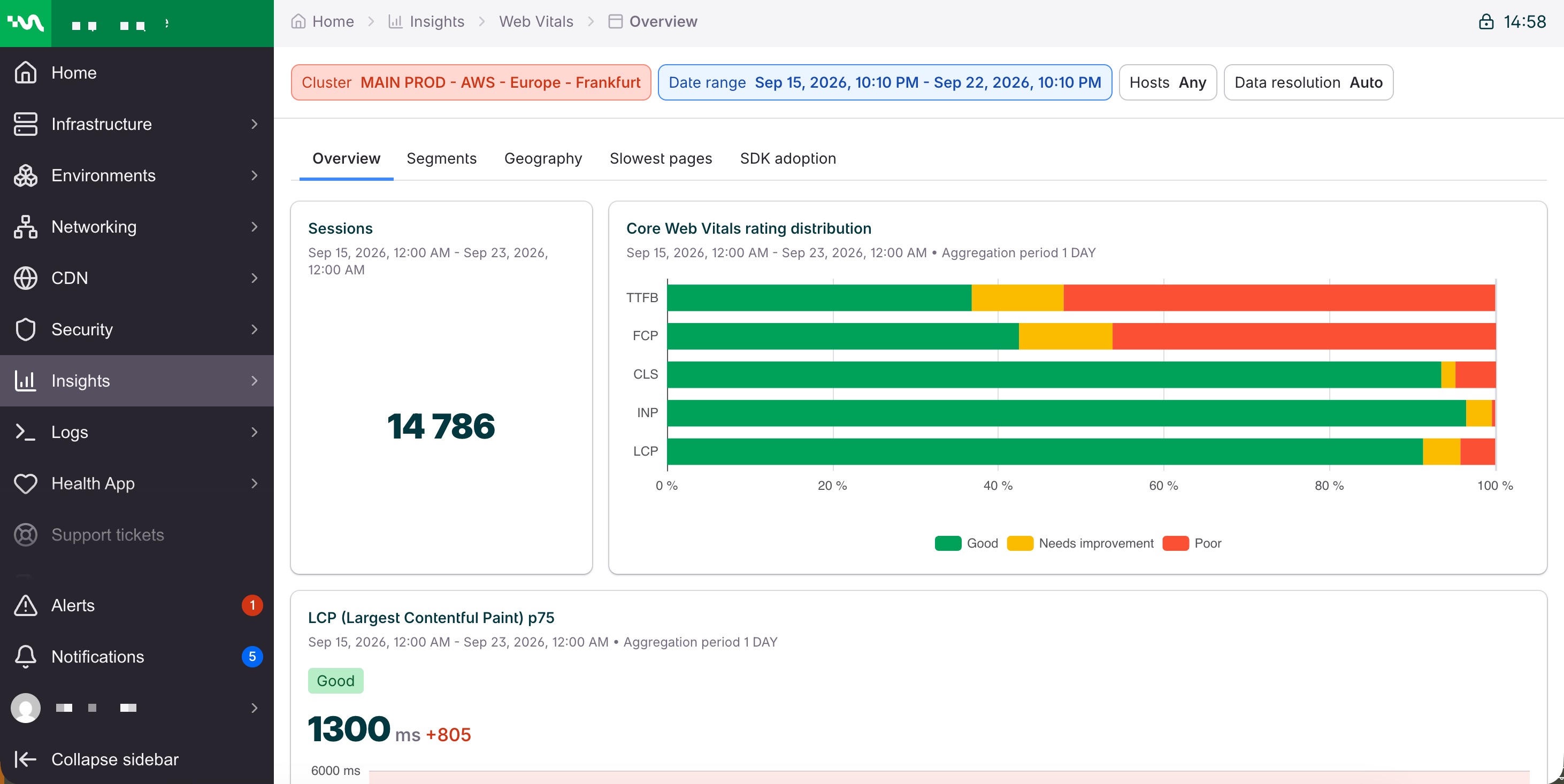
Start here when you want a health check for the selected cluster, hosts, and dates.
- Sessions: how many browser sessions reported. Treat a small count as a thin sample before you trust a percentile.
- Core Web Vitals rating distribution: the Good / Needs improvement / Poor share of sessions for all five vitals at once.
- LCP, INP, CLS, FCP, and TTFB p75: the current percentile, the rating, the change versus the previous period, and the trend.
- Request count, transferred bytes, and resource bytes p75: how many requests the page made, how many bytes moved over the network, and how heavy the resources were after decompression. No rating band. See How to read a card.
Segments
Open Segments when Overview is unhealthy and you need to know who feels it.
- LCP p75 by device type, browser, connection effective type, and connection type: a phone on a slow connection can miss the LCP target while desktop on ethernet looks fine.
- INP p75 by device memory: interaction delay on low-memory devices.
- CLS p75 by viewport size: layout shift that shows up only on a narrow or wide viewport.
Values use the same rating colors as Overview.
Geography
Open Geography when performance depends on where the visitor is. Pick one vital (LCP is selected by default). The map colors countries by that vital’s p75. The table adds session count and sorts busiest countries first, so a poor rating on a handful of sessions does not outrank a country that carries the traffic. A second chart splits Good / Needs improvement / Poor by country, with the weakest countries first.
Slowest pages
Open Slowest pages to choose what to fix. Core Web Vitals by page is one table, slowest LCP p75 first. Each row is a page URL (and the host, when several hosts are selected) with LCP, the LCP sample count, INP, CLS, FCP, TTFB, request count, transferred bytes, and resource bytes. Only the five vitals are color-rated. Bytes are shown in KB. An empty cell means that metric did not have enough samples for the page.
SDK adoption
Open SDK adoption after you install the script, and again when you roll out a new version. Session share by SDK version is the percentage of reporting sessions on each @magnolia/pulse version. An empty card means no visits in the current filters came from a page running the script.