

DDoS Observer
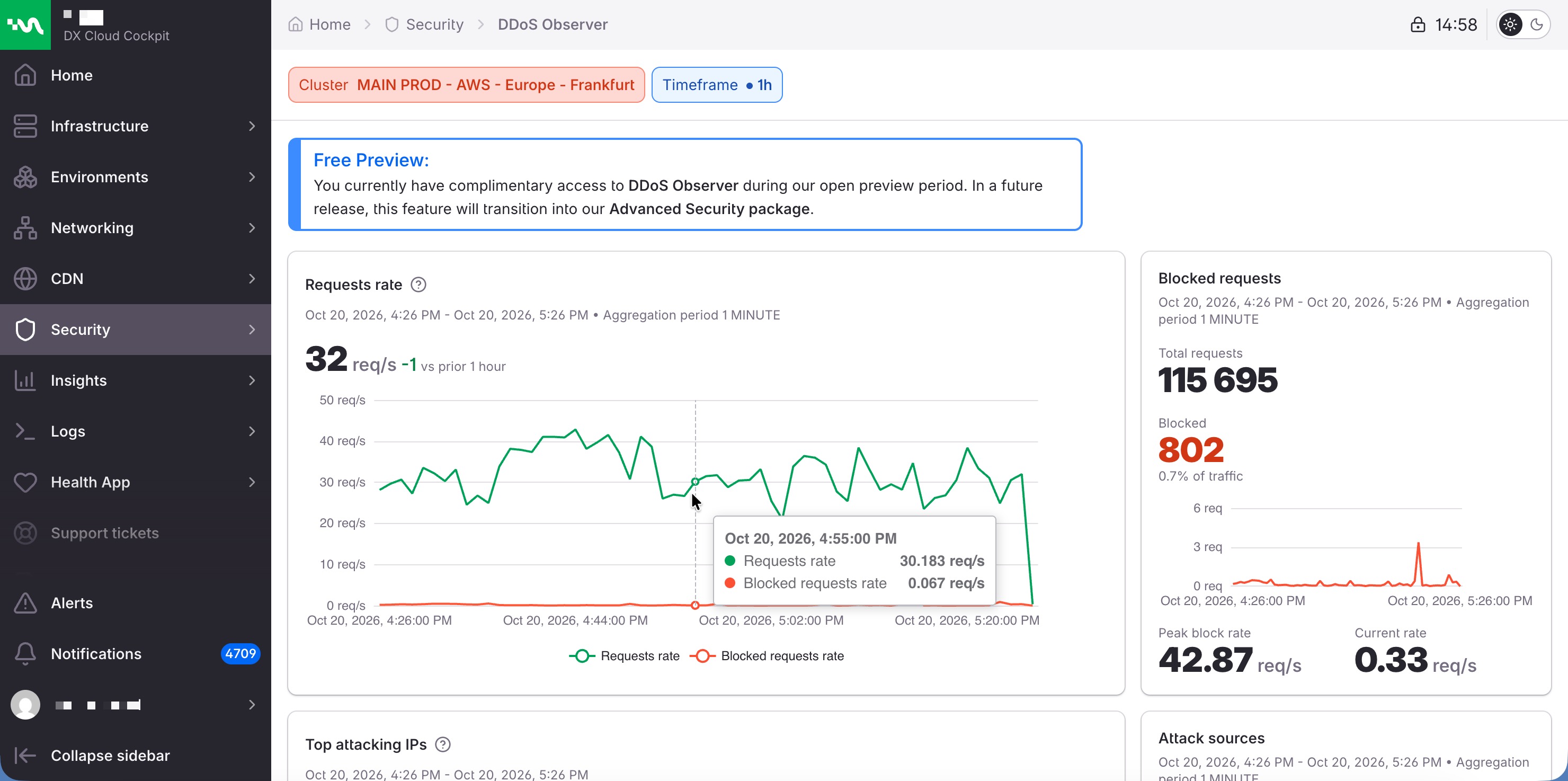
DDoS Observer shows whether a spike in CDN traffic is being blocked, where it comes from, and which hosts it hits. The page needs a cluster with CDN. It opens on the last minute.
You can select the Timeframe:
- 1m
- 1h
- 6h
- 24h
Select the ? next to a card title in the Cockpit for the metric definition.
Choose the window
Timeframe is 1m, 1h, 6h, or 24h. 1m is the window for something happening now. A longer window shows whether a spike is a short burst or a sustained flood.
What the cards tell you
Requests rate
Requests rate charts total traffic and blocked traffic together, in requests per second, across the timeframe. The figure above the chart is the average rate, compared with the previous period of the same length.
When the blocked line rises with the total line, the edge is refusing the extra traffic. When the total line rises on its own, the extra traffic is getting through.
Blocked requests
Blocked requests is the share of traffic the CDN refused in this window: the total count, the blocked count, and that share as a percentage of traffic. The chart is the blocked rate over time.
- Peak block rate: the highest blocked rate in the window, in requests per second.
- Current rate: the latest blocked rate, in requests per second.
Top attacking IPs
Top attacking IPs ranks the addresses behind the most blocked requests. A short list with high counts is the set to consider blocking. See Block IPs.
Attack sources
Attack sources is a map and a ranked list of countries for those blocked requests. Use it to see whether the pressure is concentrated in a few places or spread widely.
Top targeted hosts
Top targeted hosts ranks the hosts that received the most blocked requests. Each row includes that host’s CDN availability for the same window:
| Tag | Availability |
|---|---|
| Unacceptable | 0% to 49% |
| Poor | 50% to 69% |
| Fair | 70% to 84% |
| Good | 85% to 93% |
| Excellent | 94% to 100% |
A host that is both high on this list and Poor or Unacceptable is the one to check first.
Top malicious user-agents
Top malicious user-agents ranks the clients behind the most blocked requests. Open a user agent for a decoded view of the client, such as device and browser class.
When the page shows an attack
- Confirm the cluster and the Timeframe. A one-minute window can look severe for a burst that is already over.
- If a few addresses dominate Top attacking IPs, block them from Block IPs when the CDN is Fastly. On another CDN, use an ingress allow or deny list. The path for both is on Prevent DDoS attacks.
- If a host is Poor or Unacceptable, open that host in Security statistics and in WAF request logs.